CMS: The Ultimate Guide

featureArticle.chapters
featureArticle.introduction
The ultimate guide to the content management system (CMS). Provides the marketer with a useful overview of functionality, best practices, CMS alternatives, and much, much more!
 authorBox.about
Vegard Ottervig
Vegard Hovland Ottervig holds a Master's degree in film studies and has worked with journalism and marketing since 2010. He loves cycling, philosophy, gaming, and writing.
Chapter 1
What Is a Content Management System (CMS)?
Let us start at the beginning: Why should marketers and content editors care about what tools they work with? What does it matter if you write in Word, Docs, or Pages, perform calculations in Excel, Sheets, or Numbers, or make presentations in PowerPoint, Slides, or Keynote? They are just tools, performing certain tasks. Or is that so?
Do you think carpenters care about what tools they use, like hammers, saws, and screwdrivers? Do you think they are indifferent to the quality and function of their tools? A good hammer can knock and pull nails with precision, whereas a bad hammer knocks off balance, pulls poorly, or may even break during work.
The same principle applies to all other professions. Truck drivers, physicians, hair dressers, and programmers. All these professionals care about their vehicles, scalpels, scissors, and computers.
And so should you.
You ought to care about your tools. Especially the content management system (CMS) of your organization.
Almost every company, association, and institution have a website. Websites are no longer the one-page business card from the early 90s, with primitive HTML and design.
The websites of today are often complex eco systems of pages, images, links, system integrations, self service, shopping, and other functions. And all of these elements need to come together and be organized by a content management system.
So should you care about the tools that deliver your content on the web and other channels?
Of course you should!
Now let us continue with a definition of a CMS, as we need to know exactly what we’re talking about.
Definition of CMS
A content management system, or CMS for short, is a computer software system that organizes the creation, modification, and publication of digital content like documents and images, often in a collaborative environment, for presenting to a website or an app.
Quite a mouthful!
Such a system may also be known by other terms, such as “web content management” (WCM) or “digital experience platform” (DXP).
If you have been working with websites of any kind of way in the last 20 years, you have most likely encountered a CMS in one form or other.
The editorial staff of online newspapers use it, the digital marketing team of corporations use it, and departments at governmental agencies use it.
Everybody uses CMS.
Even private bloggers and small enterprises. They don’t edit single HTML files and upload them to the web manually. Instead they use a certain system for handling this and many related tasks in a dynamic environment.
Of course, bloggers dealing with fashion, cooking, or just their own daily lives don’t need to think about the technical or organizational aspects of running a website.
The CMS gracefully does a lot of the heavy lifting for them, either it’s on their own hosted site or for instance on a blogging platform. The CMS automates and sets up templates for a lot of technical IT stuff, so bloggers, marketers, and content editors don’t need to bother.

Practically everyone with a website presence has a CMS, and the CMS performs a lot of tasks, both seen and unseen.
Let’s have a look at some of the most common features the content management system provides. A CMS manages:
- Text editing
- Metadata
- Design
- General site hierarchy
- URL logic
- Media
- Publish dates
- User roles
- Content item hierarchy
- History editing and version control
- Indexing
- Search
- Retrieval
Some of these features any user can change, add, or remove, even though they might have limited technical knowledge. Other features are usually restricted to the webmaster or developers.
Examples of the first group are article copy, images, URL, publish date, placement in the hierarchy, and some metadata fields. Examples of the latter group include templating, design, site hierarchy, user roles, and search.
All these features are handled by the CMS, which is a great advantage and time saver for all productive editorial and marketing teams.
Some other advantages with CMS include:
- Reduced need to code from scratch
- Easy to create a unified look and feel
- Version control
- Edit permission management
Disadvantages may include:
- Limited or no ability to create functionality not envisioned in the original CMS, like layouts, web apps, etc.
- Increased need for special expertise and training for content authors
The Purpose of a CMS
Now we know what a content management system is: It is software for managing content for being displayed through a digital channel.
The purpose of a CMS may be more or less directly mentioned in our definition. However, for reasons of clarity and a more complete understanding of the concept, we will in this section discuss the intent of the system.
As we have seen, with a CMS you can put any content on a website, either if it’s simple text, images, and videos, or more complex content in the form of searchable databases, interactive tools, and advanced personalization.
What content should be placed where, what should be visible to whom, when should the content expire, and so on are questions that are solved by the CMS.
Thus, the purpose of a CMS is first and foremost content management. You and your organization decide what, when, and where to distribute your content, as well as how in the form of presentation.
The purpose is to efficiently deliver information to your audience, as well as opening for receiving information back from the visitors, like user preferences, behavior, filled out forms, etc.

This leads us to the total website experience. The content is one thing, but the services, self service functions, URLs, design, templating, and so on are a part of the package too.
A website is an integration of content and presentation, and the CMS is responsible for both aspects. This might come in different degrees depending on the type of CMS, as we will see below.
The CMS controls directly or indirectly the experience for both you and your visitors in regard to your website or a related service. The purpose is to effectively handle this “meeting place” and ensure that necessary communication is delivered both ways.
You might want to help your customers or target audience, and your customers or prospects would like to solve tasks. Which your organization and your digital offering can assist with.
Difference Between CMS and Digital Experience Platform
You might have heard the term “digital experiences” in relation to CMS. Forrester defines a digital experience platform as “software to manage, deliver, and optimize experiences consistently across every digital touchpoint”.
Whether a given customer or lead interacts with your brand digitally via the good old computer, smartphone, tablet, wearables, beacons, or facial recognition tech, their experience should be holistic, predictable, and delightful.
At the same time, all this information from across different channels should be analyzed to provide your team with a more complete understanding of the customer’s identity, intentions, and sentiments as they interact with your brand. This is where digital experience software comes into the picture.
A digital experience platform (DXP) delivers a unified experience across different digital channels. At the same time it uses analytics to understand the visitors to continuously improve.
A DXP could aid your organization in aligning strategies, processes, teams, and technologies toward an even more customer-centric approach.

The main difference between a CMS and a DXP is the scope of the service. A CMS can for instance provide a website with third-party marketing tools for SEO, analytics, and marketing automation.
A CMS can also deliver a highly specialized functionality on the website, like a well-behaved content repository, advanced search, shopping features, user profiles with file archives, and much more.
A DXP, on the other hand, may offer an integration between several different websites and digital touchpoints which all need to connect and communicate.
Whether your organization needs a DXP or not is a different question. Is your organization a member of a global network with strict brand and risk guidelines, a DXP might be the right choice for you for controlling and delivering a wide array of websites and functionality around the globe.
Are you handling somewhat simpler, but still advanced projects, an agile and flexible CMS with the possibility of integrating different tools seamlessly is likely the best option.
Remember, a CMS is at the core of any DXP, but it all depends on the number of complex operations and needs of your organization or member firm network.
Different Types of CMSs
What different types of CMSs are there? In how many ways can you manage and organize the creation, modification, and publication of digital content for presenting to a website?
As it turns out, the answer is “many.”
Here we will go through some of the most common and distinct forms of content management systems out there.
Note: There are several ways of classifying content management systems. We have chosen to classify them by key technical features dictating the relationship between content and presentation.
On Premises vs. Hosted
Let’s say your organization has decided to expand its online presence. First and foremost by offering a great and forward looking website that fulfills the needs of your customers.
The first thing you have to decide is where you will host your digital offering. Will it be on premises or be hosted by a third party company?
For most people this basic question usually surmounts to the alternative “managed vs. hosted CMS.” A managed CMS is provided as a service. All things technical are handled by the provider, like Shopify, Weebly, or WordPress.com.
The advantages of a managed system are active support, continuous development, and software that is always up-to-date. The disadvantages include lack of control over certain design elements, features, content ownership, and several other factors.
A hosted CMS, on the other hand, is a “standalone” piece of software that may be applied to your own or a third party server.
The main advantage of a hosted CMS is control: Your developers can make everything on your website work exactly as you wish. With integrations you can also add to the functionality. The disadvantage is that you are on your own in regard to updating, security, and design from the start. This is rarely a problem for professional organizations, however.
Most organizations and businesses will face the alternative of “on premises vs. hosted,” rather than “managed vs. hosted”. “On premises” means your own organization will take care of the hosting of the website and related products, with physical servers on a location that you control.
The advantages we saw from “hosted” persist, with the added bonus of increased security, data control, and a more predictable cost plan. Disadvantages include a larger portion of the organization’s resources allocated to hosting, and a larger share of risk in hosting the data yourselves.
Now that you have had time to assess the alternatives in how and where to host your content management system, you can start to look into further differences.
Traditional CMS
A traditional CMS is something most of us have heard of. In this kind of content management system, there is a tight connection between features for the editors and features for the developers.
The editors usually have access to full preview, landing page editing, URL handling, detailed access control, media repository, and more.
At the same time, the developers can code, test, and deploy both editorial and end user functionality bundled together, made possible by a tight coupling between the delivery layer and the CMS.
The feature set of such CMSs has grown over time, and many can be regarded as full scale marketing suites. This has resulted in what we discussed above: software to manage, deliver, and optimize experiences consistently across all digital touchpoints (DXP).
There are some limitations or disadvantages with the traditional CMS. For instance, the tight connection between the presentation and the content makes multi channel presence a real chore.
This is due to that a standard desktop web browser, a mobile app, and an Internet of Things (IoT) device cannot all read and present the content when the presentation layer is made for just the web.
If all your organization needs is a basic website, the traditional CMS is probably the right option for you. If you are looking for cross platform integrations or more complex solutions, this is where the alternative of headless CMS comes into the picture.
Headless CMS
The rise of mobile apps, social media, smart watches, digital signage, self-service machines, robots, and other IoT devices is changing the way we consume digital content.
All these platforms have unique properties and different methods for showing and managing content. So how do you make sure that your content is presented correctly? Making one version for each required platform is time consuming, expensive, and ineffective.
Enter the so called “headless” solution.
The main idea behind a headless CMS is to separate presentation and content. “Headless” refers to the presentation layer as the head, and the content as the body. With headless CMSs the content stays the same, while each client (app, device, browser) is responsible for how the content is presented.
Developers usually do not code in the headless CMS itself, but use an application programming interface (API) instead. An API is a tool that makes it possible for two software services to communicate and share data.
By doing this, the headless system always defines the content model and editors can start adding content. Simultaneously, developers consumes the content through a defined API. For instance presenting the content to an ATM machine or to an app on your smartphone.
While the advantage of a headless CMS may be seen as a “one size fits all” approach, there are limitations also here, especially in regard to the first generation wave of vendors. For each new client and device, the developer must manage link handling, formatting issues and templating, caching, permissions, and more.
Also, for marketers and editors, preview of the content is no longer handled in the CMS itself, but on each related API project. Without getting too lost in technical discussions, other disadvantages include missing tree structure, URL handling, landing page building, and more.
Hybrid CMS
Headless CMS has experienced a growth in popularity the last few years. As a reaction to this competition, several traditional CMS vendors have added web-based content APIs.
This has introduced the so called hybrid or decoupled CMS. A hybrid CMS arrives with a presentation layer (head), but using it is optional. This means that you can have a standard website, while at the same time control the presentational output on other channels as well.
Offerings from vendors vary, and having an API is not sufficient on its own to properly qualify as a hybrid CMS. A high quality hybrid CMS should prioritize the management of structured content over building pages, and support rich media handling. It should also include APIs with support for a wide range of programming languages.
When to Choose What CMS
Choosing the right CMS matters. What, then, should you choose when faced with the trichotomy of traditional, headless, and hybrid CMS?
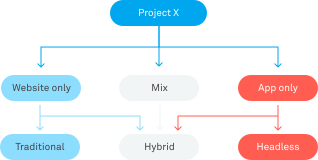
- Choose a traditional CMS if you only need a basic website
- Choose a headless CMS if your project is focused on an app or IoT with limited editorial requirements
- Choose a hybrid or next-gen headless CMS if your project involves rich web content, URL handling, extensive editorial requirements, special hosting needs, and reuse of content across projects
Still confused? Maybe this simplified flowchart can help you navigate the unfamiliar terrain:
You are now in possession of basic knowledge about the concept of a content management system (CMS).
A CMS manages the creation, modification, and publication of digital content like documents, images, videos, and other functionalities for displaying on a website.
The purpose of a CMS is content management and controlling the total website experience for the end user, and differs from a digital experience platform (DXP) in the scope of the offering.
Three main types of CMSs exist, with the traditional being for simple websites, headless for apps, and hybrid for a mixture.
Now, what exactly can you do with a CMS? Let’s delve into the details!
Chapter 2
Creating Content with the CMS
If you blog, work with marketing, or have experience with content savvy organizations, you have probably encountered a CMS.
Try to think about what you really do. If you’re responsible for content, most likely you write copy, upload a picture, and fill in some metadata. Then you either publish the article or send it to approval, in line with the principles of content operations.
Maybe you also rearrange elements on the website, like the order of articles or what to feature on the front page. Or perhaps you maintain the employee profiles, adding new pictures and updating the biographical information.
If you are a site lead, you may work with an overview of articles, where they are placed on the website, what permissions users in the system have, and what third-party integrations are allowed. If you’re a blogger, you may just make content and hit “publish”, and that’s it.
Either way, you expect the CMS to do your bidding, you expect it to be flexible and reliable, you expect it to simply work. No matter what task you have in mind: Content organization, media repository, URL structures, SEO tactics, design elements. You name it.
You rely on certain features to work not just by themselves, but also in harmony and unity with the whole system.
In our definition we listed several features you usually find in a content management system. Now we will treat these properties in more detail. We’ll start with the one feature most people are familiar with: the text editor.
Text Editing
At the heart of any CMS lies the text editor tool. Like its pure counterparts in the operating systems, the CMS text editor has grown to have a lot of strong features. In the days of yore most text editors required you to write in code, like <bold>this</bold and <p>that</p>. However, with the rise of the WYSIWYG editors, however:
What
You
See
Is
What
You
Get
Instead of endless amounts of unreadable codes, you get the “finished” product with formatted text, images, lists, videos, embeds, headers, paragraphs, quotes, superscript, underlines, links, etc. This is both user friendly and effective. It removes obstacles from what really matters: creating quality content.

Of course, this has been the industry standard for decades and might seem like a banality to mention, but you shouldn’t forget history or what really lies beneath the surface.
Many CMSs let you switch seamlessly between a WYSIWYG (pronounced approximately like “we see wig”) editor and an HTML editor. But a few has locked the editing to the visual level, for reasons of e.g. keeping to strict brand guidelines defined by the webmaster or the developers.
Some CMSs even present you the text editor in close semblance to the actual finished product, so it feels like you are editing directly on the web page. Others may require basic HTML skills and only allow an HTML editor.
Advantages and Disadvantages of Different Text Editor Types
There are advantages and disadvantages with both types of editors. A WYSIWYG editor makes it a dream to produce content.
It may be the best option for corporations that want to limit the inclusion of certain risky elements like unwarranted code, images, or the like. However, this may limit your work and the toolbar may lack options for simple features like tables, superscript, quote formatting etc.
An HTML editor gives you full control over the output, but takes it for granted that you know some basic HTML. Like how to format properly and how to write the code for links and images.
What you should look for in a CMS is a text editor that suits the needs of your organization. If you are a small or medium sized company, a hybrid text editor may fit you perfectly.
If you are a giant, international corporation, a strict WYSIWYG editor with limited choices for a broad range of users might better comply with brand and security standards.
Media
After basic text editing, the handling of images and other rich media files are probably the most common task performed in a CMS. Who doesn’t want gorgeous pictures brightening up their content, making their website more colorful, and breaking up the monotone walls of text?
Beginning with basic images, again think about what tasks you usually solve with pictures in a CMS. You don’t want your website to look dull and boring, so adding a little color and breathers is most likely your and your organization’s basic motivation for including images in the first place.
Of course, you also may want to illustrate the related topics or even difficult concepts touched upon in the copy.

An image is usually used in two ways in a CMS:
- The image is placed directly in the given page, either through the text editor or as a fixed page element/module etc.
- The image is linked to the page through metadata outside of the content in the article
These two methods are not mutually exclusive, in fact most CMSs uses both ways simultaneously. The first method is fairly easy to understand: You want an image here, after this paragraph, so you just insert it.
The second method is for a more indirect use of the image, and most commonly refers to the so called “featured” image. This is the image you want to connect to an article through search results on the website. It may also work as a preamble/preview in modules fetching content on e.g. topic pages or the front page.
This second method may also dictate what image you see on top in the template of the article itself, as opposed to images you manually put in via the text editor or the like.
Another aspect to consider about images is the management and organization of your growing collection. Once more, this touches upon a two fold approach to image handling:
- You upload the image directly from your computer, the Internet etc.
- You fetch the image from your archive
In either method, you end up stuffing your CMS archive full of images. As this will always be the case, you should enforce a logical and user friendly naming convention.
Other Media: Video, PDF, etc.
Although images play an important part of any CMS, they are far from the only media type available on the world wide web. In fact, videos are an increasingly popular medium, due to the availability of platforms like YouTube and the enthralling nature of the moving pictures themselves.
Videos can be a great way to educate and entertain your target audience. But they can be more time consuming and often require more planning and logistics than simply taking a photograph.
Your organization has to find out whether or not videos fit your target audience or buyer persona, and then plan and execute accordingly.
Videos can be uploaded locally or embedded through platforms like YouTube and Vimeo.
Embedding videos from a third party is the easiest way to integrate videos with your CMS, but as you have no control over the service, you are not guaranteed that the video will always be available when you prefer.
Other kinds of documents, like PDFs, presentations or spreadsheets, are usually uploaded to the CMS via a media uploader wizard.
Then you link to the given document in the text editor via an ID or URL function, where you browse your media depository just like with images. Embedding is also possible here, for instance via services like SlideShare.
Naming conventions and file size best practices also apply to these kinds of media, as much as they do to images. Be sure to have a logical system and keep those file sizes down!
Chapter 3
Distribution and Presentation with the CMS
Metadata and SEO
You have had fun painting your website with invigorating copy and beautiful images. Now it is time to move on to the more technical, and some would say “boring” tasks of daily CMS routines.
Yes, you have a thoughtful article, yes you have strong visuals, but you haven’t yet made your content fully visible to the search engines. The software that enables real human beings to find your content in the first place.
This is where metadata come into the picture. Metadata are fields and values that are used to tag, categorize, and describe your content. If your CMS is the library and your content the books, metadata is the filing system and corresponding labels.
Metadata helps with the following:
- Search: Adding keywords to the metadata enables users to find the given article, image, or PDF faster and easier
- Distribution: Some values indicate when and where a given piece of content will be shared. It determines the behavior of certain applications that can distribute the content
- Access: Ever tried to access a certain file, but were denied? This is due to restrictions set by the metadata. It tells the system to block anyone not fulfilling a specific requirement
Common metadata fields in a CMS include:
- Title
- Preamble/description
- Publication date
- Author
- URL
- Content type
Some advanced CMSs may include a ton more fields to fill out, like vanity URLs, redirect rules, on and off times, and much more. Whether these myriad of fields are optional or not depends on what your developers have decided and what is possible in the CMS.
For sharing in social media there is a standard called Open Graph protocol, which “enables any web page to become a rich object in a social graph.” In plain English this means that you tell social media platforms exactly what title, description, and image you want displayed on e.g. Facebook or LinkedIn.
The point of all this tagging and categorizing is to optimize your website for search engines, also known as search engine optimization, or SEO. SEO is a complex field where there are as many experts as there are advice.
To make matters even more complicated is the ever evolving nature of SEO. Google is the most famous search engine and always modifies its search algorithms. The reason is purportedly to make searches better, more precise, and more relevant for the end users.
Marketing Automation Tools
The ability to create web pages in the Internet browser does probably not impress neither you nor your organization as it might have done in 1998. While web content management is a must, users today expect something more of a CMS; they expect it to also provide a solution for marketing automation.
Marketing automation is a common designation for tools that contribute to deliver the right message to the right audience at the right time. And all by an automated process based on user behavior and data analytics.
You, the marketer, create the content and define key parameters. Then you unleash the automated machine on website visitors, email readers, and social media users. If you have created visual content, leverage TikTok for engagement. Get some TikTok followers to broaden your reach.

Today some CMSs provide integrated marketing automation tools, while others offer integrations through plugins or apps. Some CMSs don’t feature marketing automation tools or the possibility for them at all, and need to be customized by developers.
If marketing automation is relevant for your organization, you have to make sure that any CMS you consider have the ability to integrate with these kinds of tools in one way or the other.
Marketing automation tools give you the opportunity to do the following functions, among others:
- Efficient delivery of messages and follow-up of leads
- A/B testing
- Personalization
- Analytics
- Content marketing
Design
The design or presentation is closely linked to your CMS. However, as we saw under “headless CMS” above, it is possible to separate presentation and content.
The goal is to send editorial content to other platforms and devices where traditional desktop or mobile web browser visuals do not apply.
For our purposes here we will talk about the design and the content together. The CMS executes both the form and the style, especially if it is a traditional or a next-gen headless CMS where you can choose when and where to make it headless.
What does this mean? Isn’t the design of the website controlled by CSS and HTML anyway?
One thing is to ornament your skyscraper with nice fronts, touches and details, but what decides the blueprint and the support beams for the building itself?
The architecture.
And the architecture in our digital marketing world is the database and CMS itself. It lays out the guidelines and the basics, whereupon HTML (the structure) and CSS (the layout) add some necessary finishing touches. The same principle applies to responsive and adaptive design.

Back-end Affects Front-end
When considering a CMS you should be aware of the structure and hierarchy of content in the back-end.
For instance, in WordPress there is a strict distinction between what is known as “posts” and “pages.” These two different content types decide certain behaviors, placements, and functionality on the finished website.
In Adobe Experience Manager you can structure your entire site in a tree menu, decide various content types, like “topic page”, “service page”, “news article,” etc. Then you can enforce rules of what types of pages are allowed to be displayed where on the live site.
Keep in mind how the seemingly internal rules of a CMS regarding the structuring of your pages and files most likely have a direct impact on how you can set up your website and how it looks.
If you are on the lookout for a new CMS for your organization, make sure it offers you flexibility in how you set up your entire site. This includes full control over the tree structure, category organization, content type allocation, and so on.
This solves several tasks for you. It also provides your content team with a sandbox of guidelines for what elements your design should prioritize in order to emphasize your most important content, offerings, etc.
Templating Support for Changing Designs
A template is a quick and easy way to make a professional résumé in a text editor program or a gorgeous slideshow in a presentation program. Templating also applies to websites.
Your chosen CMS should offer a way to template entire pages, as well as individual modules or elements within pages.
Templating makes it easy to switch the looks of your site, but also to implement new functionality fast and easy. This is due to only changing one parameter instead of copy pasting long lines of HTML.
Setting up and quality checking different templates is a way to make your content compliant with both brand guidelines and technical requirements.

Support for templating makes the operation of a website not only flexible for the site as a whole, but also for all the modular parts. These you can use and reuse across the site in a matter of seconds.
A quick checklist for design considerations should be in order. A design friendly CMS should enable you to:
- Easily decouple the presentation layer (the design) from the content layer
- Set up a hierarchical site structure that can work as a blueprint or support beams for the live website
- Add flexibility for the developers, to let them innovate and add codes without breaking the presentation part of the website or app
- Support templating for easy changes and modular workings of the design
Design System
With the advent of smarter and more flexible technology, the world of CMS has witnessed the rise of design systems. A design system may ensure brand compliance across digital experiences, and can be defined as follows:
A design system maintains in one place the visual and functional elements of an organization, fulfilling its brand principles through design, realization, and development of products and services.
A design system is more than a brand repository. It is a system with both guidelines and ready-made code to deliver visuals and functionality into your digital experiences through a CMS.
The contents of a design system can be used by your editors, designers, and developers in diverse, but brand compliant presets on your website or app.
The design system may include the following contents:
- Organization principles: The most abstract elements. Details vision, purpose, values, and tone of voice.
- Design principles: More tangible. Includes design purpose, brand identity, style guide, and language guidelines. Think colors, fonts, shapes, icons, images, and sounds.
- Components and patterns: The building blocks. Components may include buttons, cards, text fields, and progress bars, while patterns specify how to use components consistently.
There are different types of design systems, varying from strict and centralized to loose and distributed:
- Strict or loose: Comprehensive documentation vs. a general framework with more room for experimentation.
- Modular or integrated: Interchangeable and reusable parts for quick scaling vs. fixed parts for stability.
- Centralized or distributed: One team in charge vs. several professionals contributing from several teams.
Whether or not your organization should use a design system with your CMS depends on your specific needs. Do you e.g. need to have a firm grip of your brand, do you need to quickly scale design elements, or is the simple and traditional CMS approach sufficient?
General Site Hierarchy
We mentioned that the ordering of website pages in a CMS is instrumental to the looks and feeling of your finished product. Design is one thing, and another important aspect of a CMS’ control over site hierarchy is for your own convenience: Order.
Most people probably like to keep some order and tidiness in their homes, minds, and daily chores. Why should the tool for your digital experiences be any different?
Any great CMS keeps your content in an orderly fashion, with a clear cut hierarchy of folders and files giving you a sense of context. The purpose of this is to enable you and your team to easily browse and retrieve published and unpublished content. As well as getting an overall picture of what task your site is supposed to fulfill.
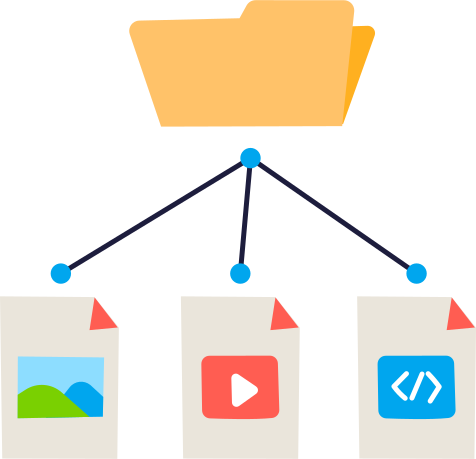
How you organize your site is entirely up to your organization. But your chosen CMS should at least feature the following functionality in site hierarchy:
- A panel for a complete overview of the elements of your website (pages, images, fragments, etc.)
- Easy navigation of said overview
- Sorting options for a variety of preferences, e.g. sorting manually, alphabetically, and chronologically
- Closely connected to a toolbar, allowing you to easily search, create, delete, edit, duplicate, move, and preview content
Are there any best practice when it comes to organizing your content within the site hierarchy? It all depends on what you need.
If your CMS has a great search function or even an enterprise search, tight hierarchical organization for browsing purposes might not be necessary.
Some CMSs use a separate, silo-esque method of uploading, storing, and retrieving images in the same complex of folders and subfolders. Again, a good search function renders this unnecessary.
If you only would like to get an overview of your website offering, maybe a XML sitemap will do the trick instead of rigid structuring in the CMS.
URL Logic
Another nifty function you can fully control with a CMS is the URL logic. This is closely related to the site hierarchy, as in most CMSs you need to set up pages and subpages in the same way they will appear in the address bar, also known as the URL.
For instance, say you work for a bank that has a topic page about investing, with subpages about stocks, bonds, and mutual funds.
The topic page about investing has the address “example-bank.com/investing,” while the other three have “example-bank.com/investing/stocks,” “example-bank.com/investing/bonds,” and “example-bank.com/investing/mutual-funds,” respectively.
To achieve this logic under normal circumstances, you need to place all the three subpages under the topic page in the CMS site hierarchy:
- example-bank.com
- investing
- stocks
- bonds
- mutual-funds
- investing
Vanity URL
When working with URLs in a CMS, you may also have heard about something called vanity URLs. What are those?
In short, a vanity URL is a unique web address that is shortened to fit a marketing or usability purpose. An example may be as follows:
- Original URL: example-bank.com/blog/how-invest-your-money-financial-sector
- Vanity URL: example-bank.com/investing
The purpose is to make URLs for important pages shorter and easier to remember, while keeping the original site structure in one piece. The vanity URL redirects to the original URL, but often you may choose to keep or discard the new and shorter URL in the address bar.
Chapter 4
Editorial Management in the CMS
Publish Dates
If content is king, then timing is queen. Together, this royal couple can make or break a content strategy. As you probably would have the king and queen make your strategy a success rather than a failure, you not only need to pay attention to content, but to timing as well.
In other words, publish dates.
Back in the old days all kinds of organizations controlled when their ads, marketing material, and information brochures were distributed. When content was sent out with the postal service, when it was displayed in the newsstands, when invitations to events were distributed.
This need of timely control has not evaporated with the emergence of digital technology. Today management of the content’s timing is more crucial than ever, in a world where the Internet flows over with content.
You need to reach the right audience with the right message at the right time.

Hence, most content management systems give you advanced control of drafting, publishing, unpublishing, republishing, on and off times, as well as detailed control over the publish date down to minutes and seconds.
Being able to plan and schedule content in the future enables you to have a steady flow of content. For instance a predictable schedule on a blog, making the experience smoother for the consumers.
It is also nice to have the ability to schedule content at a point of time when nobody on your team is available, but when your readers are most ready to digest it.
On and Off Time
While most of the aspects of publishing might be self explanatory, a feature like “on and of time” might not be.
This function decides when a specific piece of content will be available and when it will not. Say, for instance, that your task is to organize dozens of events, and every event has its own page.
Instead of manually returning to each event when it’s too late to sign up, you specify when the article will be unpublished, i.e. when it will expire or be “turned off.”
Another example may be a seasonal event, say, a branded summer campaign. It makes no sense that this is available during the cold winter months. Through the CMS you can decide that the page will be “on” in May, June, July, and August, while it will be off in the remaining months.
User Roles
Most organizations have a hierarchy. That is a structure where members are ranked above, below or at the same level as others according to relative status or authority.
A CEO is higher in the hierarchy than a janitor, and the former has more executive power and insights into all the statements and records of the organization than the latter.
The transferring of this principle to a CMS makes sense: Some coworkers have more responsibility than others, and yet others have a specific, technical function no one else in the organization can replace.
A person hired to write copy should not have access to change the structure of the website. An editor should not have access to change the codes behind the website. And a developer should have full access to all levels to code and quality check the test results in all facets.

Any CMS with respect for itself and the security of its customers have the possibility to manage users and roles. Roles vary depending on your needs, but common roles include:
- Administrator
- Editor
- Author
- Contributor
Your chosen CMS should provide you with an overview where you can fully control who gets to see and do what tasks in the system.
Who has the right to change code? Who has the right to rearrange the page hierarchy? Who has the right to only write articles? The user role control panel should help you decide.
Revision and Version Control
You discover a most grievous mistake in one of your articles. A paragraph with well written and thoroughly reasoned arguments have accidentally been deleted.
And worse yet: The content was deleted several days ago! If this was the late 90s and your software was a text editing program, your carefully executed lines of text would now be gone forever.
Enter the new millennium, a time and place where you can undo these kinds of subversive mistakes with a beautiful thing called “revisions.”
With the advent of services like Wikipedia and Google Docs, a version history is now always present. Every time you save changes in Wikipedia or do anything in a Google Doc, the system saves the previous version. At the same time it both saves and publishes the new and current version.
Make sure that your CMS includes this feature, as you always can go back in history to find a given edition of your content.
Revisions are an inbuilt security mechanism for your content, and ensures that you never lose progress. It is also a form of audit, which you can use to quality check all published content over time and observe what actually did occur in the past.
In some ways revisions are audit logs in a way similar to blockchain technology, where all transactions are automatically stored in nodes for everyone in the network to see and verify.

Version Control: Is It Published or Not?
Publishing and bringing back lost content is one thing, but knowing and having full control over live versions and changes to it is another matter.
When you have published content in some CMSs, all the following edits are made live on the fly. But what if you want change certain elements, but postpone the publishing to a later date?
There is a difference between saving and publishing/updating your content, but not all content management systems take this feature into account.
If this is an important issue to you, make sure your chosen CMS includes the possibility to not only publish and saving changes to published content before updating live, but also to make this distinction crystal clear to you in the user interface.
Accessibility and Usability
Accessibility is the principle that sight or hearing impaired people should be able to see and hear the contents of your website and navigate it easily.
The more people who can consume your content, the merrier. The same principle applies to your content editors: the more who can use the CMS, the better.
If the CMS fulfills accessibility standards, it also enables any person to contribute to your website.
One well-known accessibility standard is WAI-ARIA. This is a technical specification by the World Wide Web Consortium (W3C), specifying how you can increase the accessibility of your web pages.

Certain functions of modern websites with dynamic content and advanced user interfaces are not available for people with disabilities. For instance, people who rely on screen readers or who cannot use a mouse might have a hard time navigating certain websites.
This is where standards like WAI-ARIA come into the picture, to help you helping your audience.
There is, however, a divide between what you see externally on your website and how your CMS looks and feels “internally.”
As this is a page about CMS, we concentrate on the latter. How accessible is your CMS, and how easy is it to use?
Accessibility is often connected to usability and user friendliness/user experience (UX).
Some general UX principles to consider in your CMS include:
- Minimize the number of options available for users
- Incorporate auto save functionality and robust error handling
- Provide task based interfaces
- Hide technical details from end users
- Provide efficient user interfaces
- Provide help and instructions
- Minimize training required
- Support self sufficiency
- Present the CMS in a logical organization
- Have clear and easy to understand iconography
- Enforce logical and neat naming conventions
- Provide thorough documentation
- Be aware how third party software affects your CMS organization
Of course, a lot more could be said and written about UX. You should see this as a start, and not as a detailed investigation about how you can think about usability and accessibility in your chosen CMS.
Chapter 5
Headless CMS
Headless CMS has taken the world by storm. It has excited developers all over the world by releasing them from their monolithic shackles and enabling them to work with any front-end they desire.
But what exactly is a headless CMS? Why should you use it? What use cases are there? And are there any challenges you should be aware of? Learn more about these and many other topics in this Ultimate Guide to Headless CMS!
Definition of Headless CMS
Before we delve into the nitty gritty details of the headless world, it would be wise to know what we are talking about in a fundamental sense. Let us start with a tentative definition, to ensure common ground:
A headless CMS is a computer software system that organizes digital content by separating it from presentation, letting the content be reused in any channel.
Now let us expand this definition:
A headless CMS is a computer software system that organizes digital content by separating the content layer from the presentation layer, allowing editors to create content to be sent to multiple channels via APIs, and allowing developers to build front-ends and clients using their preferred framework.
What do we mean when we talk about layers? Imagine that you are editing a web page in a traditional CMS. You change the text, images, layouts, and more advanced components in a visual editor. The content itself and how it appears are closely tied together in one layer.
Even though modern websites built with a traditional CMS have responsive design and can change its presentation in accordance with different screen sizes, they still have one layer. Try to show a given page on your smartwatch or automatically reuse a textbox from inside a layout on another website. No dice.
This is where the separation of content and presentation comes into fruition. Keeping content in its separate layer and presentation in its own respective layer allows for the following:
- Content can be structured, categorized in types, and treated logically and predictably
- The structured content can be reused in different channels through an API
- Front-end developers can use the tools and frameworks of their liking to present the content on different clients (channels)
- Content thus has one source, where you can create, edit and maintain it, while the presentation has unlimited channels: ranging from wearables and IoT to web and voice interfaces
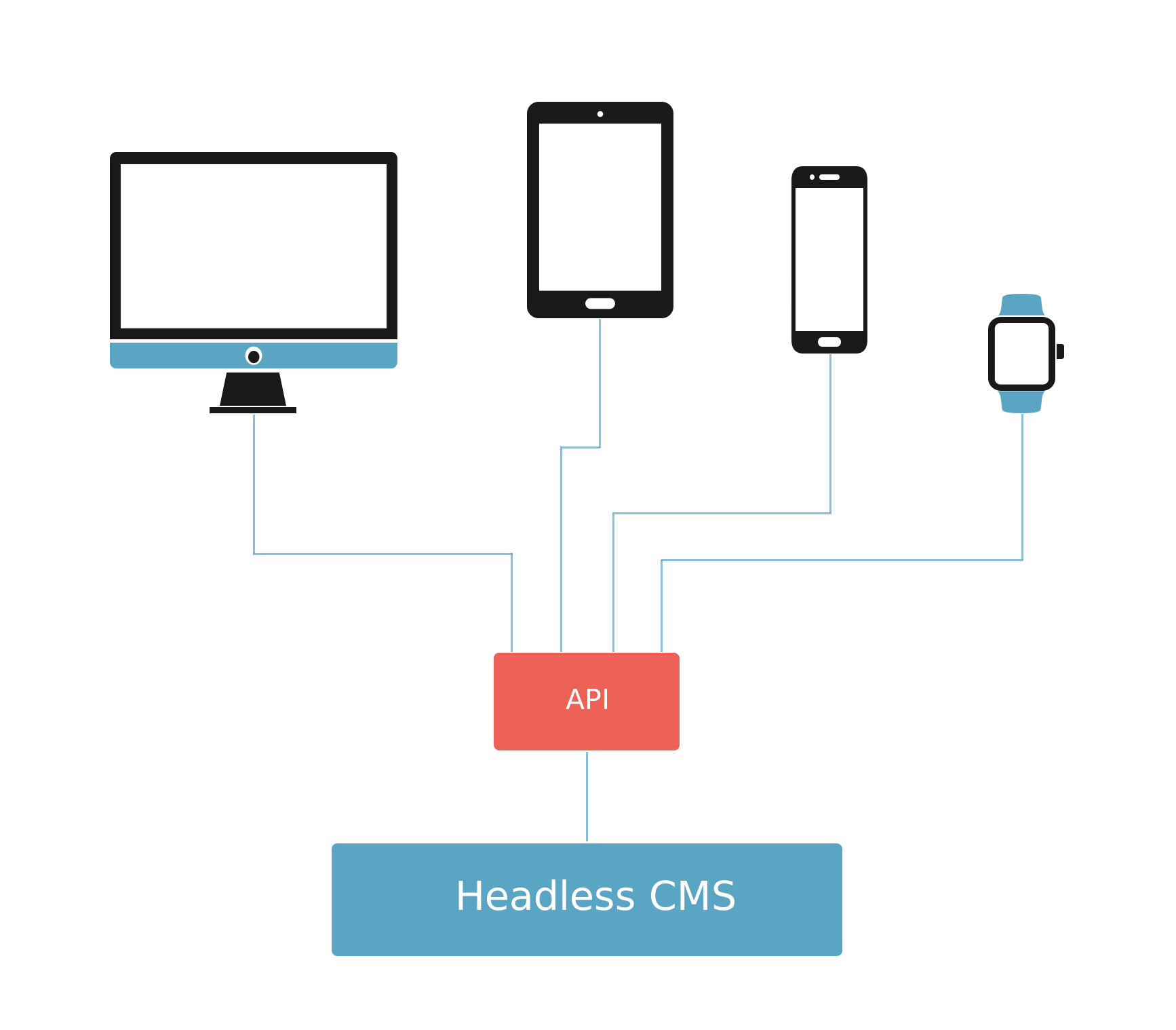
Why is it called “headless?”
When the presentation layer (head) is cut from the content layer (body), you get a headless body ready to be distributed to several different “heads”.
These heads are channels like websites, mobile apps, smart watches, TV screens, digital signage systems, voice assistants, or even your coffee machine. A “headless” CMS is in reality a “headful” CMS, like the mythical hydra.
Another explanation of headless amounts to this short one: A headless CMS is essentially a database with an API (an API is a toolbox for making different platforms speak to each other).
[youtube url="https://www.youtube.com/watch?v=dhksx6rlM1Y"/]
Background
The idea behind headless CMS is actually nothing new. Separating content (data) and presentation has been developer best practice for decades. The Norwegian computer scientist Trygve Reenskaug even coined the term “model view controller” (MVC) in 1979.
In our context, the headless CMS acts as a specialized database. It has an interface that allows editors to create and nurture their content. This would be the “model” in the MVC concept.
The headless approach allows developers to build clients, using their favorite tools. The client connects to the headless API, fetches the content it needs and takes care of the presentation (the “view” and the “controller”) locally.
Accordingly, almost all of the early publishing systems were “headless” in this sense. These pioneering systems focused on editing and publishing form based content, often in the shape of news articles.
Sound familiar? However, there are some major differences between then and now:
- The client was most commonly a website, retrieving and listing articles
- Both the client and the CMS were located behind the same firewall
- For some solutions, the “API” was simply the database. Solutions with an API were rarely exposed on the open web
- Data was exchanged through XML or binary formats, rather than JSON
As content management systems matured and customer requirements increased in complexity, the world saw the rise of the web content management (WCM) and digital experience platform (DXP).
These monolithic behemoths offered a richer set of features to please editors, like visual editing and marketing tools. Developers were also provided with a simplified, although more restricted development approach.
This state of affairs was fully sustainable in a world of mainly web browsers on desktop or laptop. But technology never stands still. We have seen a proliferation of cloud first services, together with the introduction of omnichannel in the form of mobiles, IoT, wearables, and front-end frameworks with rich web clients. This made CMS vendors, both veteran and startup alike, see the need for a headless approach.
As a result, WCM/DXP vendors have added web based content APIs to combat their pure headless competitors.
Headless vs. Traditional CMS
Traditional CMS
What is the essential difference between a traditional CMS and a headless CMS? To put it bluntly: A traditional CMS keeps a close link between content and presentation, while headless cuts this tie.
The editors have access to full preview, landing page editing, URL handling, detailed access control, and media repository. Meanwhile, the developers can code, test, and deploy both editorial and end user functionality bundled together. This is made possible by a tight coupling between the delivery layer and the CMS.
A disadvantage of tight coupling in traditional content management systems is a troublesome multichannel presence. A standard desktop web browser, a mobile app, a wearable, digital signage, and an Internet of Things (IoT) device cannot equally read and present the content when the presentation layer is made exclusively for the web.
That's where headless CMS enters the scene.
Headless CMS
The rise of mobile apps, social media, smart watches, digital signage, self-service machines, robots, and countless IoT devices is changing the way we consume digital content. All these platforms have unique properties and different methods of presenting and handling content.
The problem of multichannel delivery, as well as the rise of rich front-end frameworks that delight the developer, are exactly what a headless CMS addresses.
With a headless CMS the structured content stays the same, while each client, an app, a device, or a browser, is responsible for how the content is presented. Developers usually do not code in the headless CMS itself, but use the API and code in another framework of their own choice.
The Ping Pong Development of CMS
Content management system history is torn between traditional and headless manifestations. It can be compared to a table tennis match, where the ball is hit from one playing field and over to the other. Where one field pleases one set of employees in your organization, it displeases another set of colleagues. And vice versa.
The pattern is as follows:
- Traditional CMS: The editor is happy, but the developer is unhappy
- Headless CMS: The developer is happy, but the editor is unhappy
In a traditional CMS, including marketing suites and digital experience platforms, the editor can work happily in a user friendly editorial environment. Features include visual page editing, tree structures, and contextual preview. The developer, however, is forced to work within a set system, where the CMS and the front-end are tightly linked.
With the rise of the first gen headless CMS, the tables have turned. Here the front-end is separated from the CMS, allowing the developer to work with his preferred tools and frameworks. The editor, however, must now toil with form based content, with limited possibilities for visual page editing, previews, and URL management.
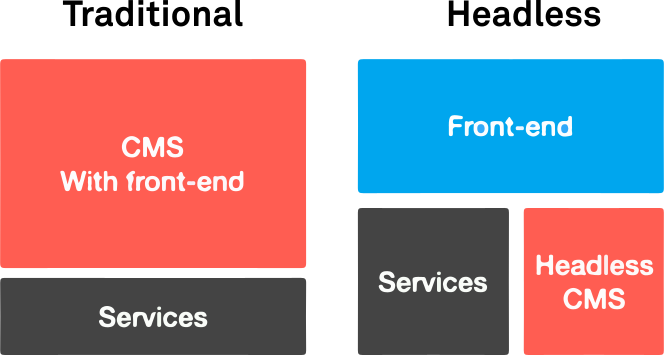
Not All Headless CMSs Are Alike!
Headless CMS is not a strictly homogenous category. Some are “first gen” or “cloud native,” meaning they are only available as cloud services and not software. The “Headless as a Service” approach simplifies scaling, monitoring, backups, and more—but sacrifices flexibility and control.
Other headless content management systems can be dubbed as “next gen” or “hybrid,” but what are these?
Next Generation Headless CMS—Composable CMS
As mentioned, a “pure” headless CMS is more or less a database with an API and an authoring interface. With the API you can deliver your content or snippets to different clients, like voice assistants, wristbands, smart watches, AR glasses, or as a part of third party websites.
A first generation headless CMS will most likely offer you minimal help to build complete websites, as the tie between content and presentation is cut completely.
Most organizations primarily need websites, but first gen headless is not focused on content driven websites. This means that your organization may need multiple systems running to handle things like structured content, page composition, URLs, and everything else that is required.
To combat the multi system approach, the next gen headless CMS enters the fray. A next gen headless CMS can structure content and compose websites—in one system.
All the lightweight headless features are there, but with the added (and optional!) functionality of visual page editing, previewing, hierarchical tree structuring, URL and SEO management, page templates, detailed permissions, back-end integrations, and API customization.
Such a CMS is also called a composable CMS, as it allows you to orchestrate or direct your APIs and digital experiences from the CMS itself. Here the developers are happy with the separated front-end, and the editors are happy with a user friendly and visually oriented editorial environment, which can also handle integrations and APIs.
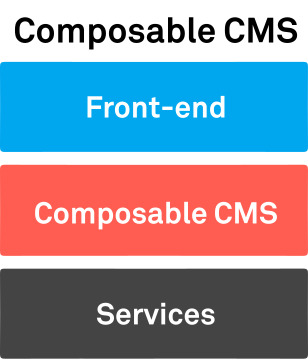
Side-by-Side Comparison
Content Management
The high level stuff, from fundamental structure to basic capabilities and features.
| Traditional | 1st-Gen Headless | Next-Gen Headless |
Content types | Maybe, usually page oriented | Yes | Yes |
Rich text editor | Yes | Depends | Yes |
Image service | No | Yes | Yes |
Web APIs | No | Yes | Yes |
Hierarchical tree structure | Yes | Depends | Yes |
Content level access control | Depends | Depends | Yes |
Workflow | Yes | Yes | Yes |
Web and Presentation
The look and feel of things, and how the triad copes with stuff like presentation, previews, and URLs.
| Traditional | 1st-Gen Headless | Next-Gen Headless |
Presentation layer | Yes | Depends | Optional |
Landing page editor | Yes | Depends | Yes |
Page templates | Yes | Depends | Yes |
Preview | Yes | Depends | Yes |
URL handling | Yes | Depends | Yes |
SEO | Yes | Depends | Yes |
Hosting
The most techy stuff for last, with a focus on software, cloud, CDNs, and other aspects.
| Traditional | 1st-Gen Headless | Next-Gen Headless |
Software | Yes | Maybe | Depends |
Cloud hosting | Optional | Yes | Optional |
Content delivery network | Optional | Optional | Optional |
Autoscaling | Optional | Optional | Optional |
Benefits
Compared to a traditional CMS, a headless CMS has several benefits. This is partly due to shifting the responsibility for the user experience onto the client, such as a browser or an app.
But let us first see why headless CMS is increasingly becoming the preferred technology in the world of content management systems.
Why Headless Is Popular
A traditional CMS can be irritating for developers. The close link between content and presentation makes it difficult, if not downright impossible for a developer to create solutions across different channels with reuse of the same content. Building separate silo solutions for each channel further multiplies the unnecessary workload for the developer.
Traditional content management systems may also feature suboptimal APIs created as an afterthought, and they are overwhelmingly page oriented.
A third reason why headless is on the rise is the influx of rich front-end frameworks. Why should a developer go through the hassle of teaching himself a proprietary and most likely cumbersome CMS framework? Especially when he can freely choose between the likes of Next.js, Nuxt, SvelteKit, React, Vue, and all the others in the front-end ocean?

With a headless CMS, developers work with structured content. This is content organized in a predictable way and classified with metadata. With the advent of omnichannel, developers now work with data instead of HTML and layout—and reuse it wherever needed.
But different devices and different needs are not the entire story. As pointed out, innovation within front-end framework technology has paved the way for headless as well, catering to rich web experiences.
Just think of Gmail, Facebook, or your online bank. The functionality in these services go beyond the classic website, and work as an application with fast loading times and specialized operations.
Functionality in many modern and rich web experiences are coded in the web browser using the developer’s preferred front-end framework. It is here that headless CMS is especially suited for delivering content.
The headless CMS makes content like help texts, infoboxes, labels, and other editorial content from a central database available to different channels and front-end frameworks.
Other Perks
In addition to the benefits we already have covered, there are several other perks as well:
- Flexible development – Headless is front-end agnostic, allowing developers to build sites, apps, and solutions on various platforms with the preferred programming languages.
- Improved experiences – Liberating front-end developers from the back-end structures allow for more time and energy to build richer and more responsive digital experiences.
- Increased speed – Shifting presentation to the client streamlines back-end processes and enables applications to operate faster than before.
- Lower operating costs – Although this depends on a customer’s choices, complexities with the specific setup, and the pricing model of the vendor, headless is out of the box cheaper than a traditional CMS.
- Reduced time to market – The front-end/back-end separation enables developmental reduced time to market, but the same principle applies to the content creation team: The focus is now on the content itself and not how it will appear on different front-end layers, together with one source for reuse.
- Ease of use – As a headless CMS is essentially a database, it may offer fewer options for the content creator in the form of switches and sliders. Again the focus is on the content itself, and not on the excess of presentational possibilities.
- Flexibility – Headless provides developers with API flexibility and the ability to pull out any specified data to their preferred clients.
- Cloud scalability – Most headless systems are cloud ready, meaning the ability to scale in accordance with long term growth and traffic spikes can be handled by multiple environments, clusters, CDN, and other modern technologies.
- System security – The vendor is responsible for handling security issues. Also, the API is often read-only, and can be stored behind layers of code. Finally, the admin of a headless CMS can often be found on a different server and a different domain than the main offering.
Future Proof Technology
As we have seen, the nature of headless CMS makes it perfectly fit for future proofing enterprise technology. That’s why it is a central component of the MACH Alliance, which “presents and advocates for an open and best-of-breed enterprise technology ecosystem.” “MACH” stands for “Microservices based, API-first, Cloud-native SaaS and Headless.”
All the elements of the MACH Alliance are interconnected, but headless is especially relevant for API first, cloud, and, of course, headless itself. With a real headless CMS all functionality is exposed through an API, and it can be fully cloud driven, with advantages in storage, hosting, scaling, and upgrading.
But the real gem for developers is the decoupling of the front-end presentation from the back-end logic. The truly future proof headless vendors are agnostics with frameworks and APIs. This enables the developers to build solutions with exactly the tools they prefer.
Structured Content
Content is a fundamental building block of headless CMS. Aside from being described as a “database + API,” what is special about the content with which headless systems deal with?
First of all, a headless CMS manages structured content. This is information organized in a predictable way and most often classified with metadata.
Content Types
Being “structured” means that each content item of the same type has the same structure (duh!). They all have the same fields and the same logic. Thus, all content items of the same type can be treated in a uniform and predictable way in different scenarios.
Examples of content types can be article, page, person, case study, recipe, car, book, course, video, office, product, event, and audio.
Structured Example
Let us illustrate the principle of structured content with an easy example: a blog post. This content type commonly includes fields for title, image, intro text, author, date, body text, category, and tags.
As each content item includes the same fields, the CMS can now treat them as one. Let us say you want to show a list of your recent blog posts. The CMS can then extract the data from the fields title, image, and intro text, as well as use the date field for chronological listing.
In this simple example, the editors have created blog content once, which are then reused in a blog list elsewhere on the website. This is the basic principle behind the scaling, reuse, and repeatability of content in a headless CMS.
A true headless CMS not only supports the presence of content types. It is a requirement for its existence.
Image and Media Handling
As mentioned above, images and other media files are also to be regarded as content types in a headless CMS with true structured content capabilities. Why? Because the principle of reuse applies just as well to images, videos, and audio files as any other content type.
These files can have several fields for metadata, which can be used for extracting e.g. geodata for an app showcasing media for various locations in the world.
Metadata and use cases are one thing. Another important matter in regard to image and media handling are the built-in tools in a given headless CMS. Like in many other instances, no headless CMS is alike in this matter.
Editing images with actions like cropping and setting focal points is a feature content editors covet. It makes it easier for them to deliver exactly what they want to express without involving third party tools.
On the other hand, developers have APIs for images that enables them to create URLs to different image sizes, apply filters, etc.
Make sure to investigate whether such editing features are present in any headless CMS you are considering.
Block Editor
While it is fairly easy to understand the role of fields and content types when it comes to structured content, things get a little more complicated with block editors. Many organizations seek the ability to create complex content that is still highly structured, and this is where the block editor comes into play.
A headless CMS that supports block editors makes it possible to add or remove fields from within a so-called “set” in a given content type. This can for instance be an article that allows the editors to insert blocks for rich text, image, video embedding, contact point, table, or any other requirement one must have.
The idea is to recreate the possibility of having rich content and page editor-like controls, while at the same time making the content highly structured for reusable purposes. Something which corresponds well with the world of headless.
Supporting the Authoring Process
One common concern content editors have about headless CMS is the diminishing of their smooth and visual tools for creating, editing, and maintaining content. Switching from tree structures, WYSIWYG page builders, and marketing suites to a “database and an API” does not sound especially tempting.
It is true that some “pure” headless vendors have little to offer the marketing side of the organization. However, many headless vendors offer features that support the authoring process. This is what we call “next gen headless CMS.”
Collaboration
Collaboration tools include the possibility to communicate, assign tasks, and see what your colleagues have been doing in the CMS. Some of these features can easily be handled by third party services like Slack and Google Docs. But if your team wants a close knit editorial and collaborative experience, you might want to research their prevalence in any headless candidate.
Workflow
Workflow is another feature that can go amiss when the authoring process only consists of a database. However, a workflow is an invaluable tool for the digital team, letting them easily identify the status of each content item.
Is it in draft mode, is it ready to be published, is it sent to review, or is it already published and all is well? Whether such information appears in the form of visual cues or textual statuses can be very different from vendor to vendor. As always, be sure to test any candidate thoroughly.
Version History
Any Wikipedia editor knows that the ability to see the version history of an article and compare changes is both useful and time saving. To quickly determine revisions and go forward or roll back in any content item is critical for a smooth and efficient editorial process. This feature is a must for the content team.
Content Operations
All of these features for improved authoring process support really culminate into one principle: Content Operations, or ContentOps. This is a content production principle detailing the step between strategy and delivery, integrating people, process, and technology. ContentOps takes the creation and management of content as seriously as developers who create and review code.
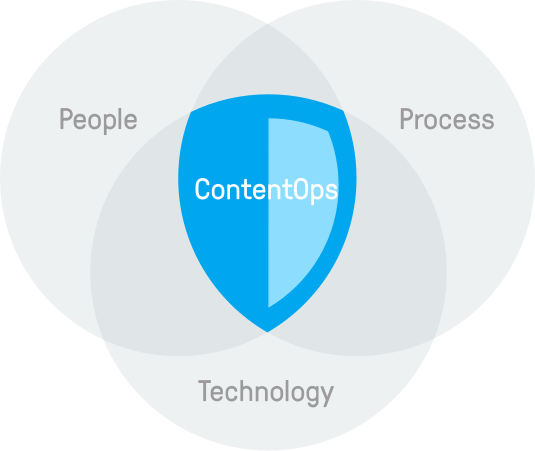
The ContentOps principle amounts to the following: How well can you execute the coordination of people, processes, and technologies in your organization to best plan, create, and maintain content indefinitely?
And how does headless CMS fit into this? It is a crucial element within the technology category. It must work together with the aspects delivering excellent content and services to your target audience. These include copywriters, subject matter experts, stakeholders, strategy, workshops, writing, filming, reviewing, CRM, and marketing automation.
APIs
Now that we have covered the first part of the “headless equation” [database + API], it is time to turn our focus to the second part: API. An application programming interface is a computing interface that lets different systems communicate with each other.
In layman’s terms, an API is the chain between your content (database) and any device or platform displaying it (client). Information about the API tends to be what developers covet the most in any headless CMS. Needless to say: the API has to be very good and flexible to impress.
Let us take a look at some of the popular API technologies.
GraphQL
GraphQL is an API query language developed by Facebook. Being strongly typed and self documented, it enables client developers to request exactly the information required in as few requests as possible. It is a perfect fit for headless CMS.
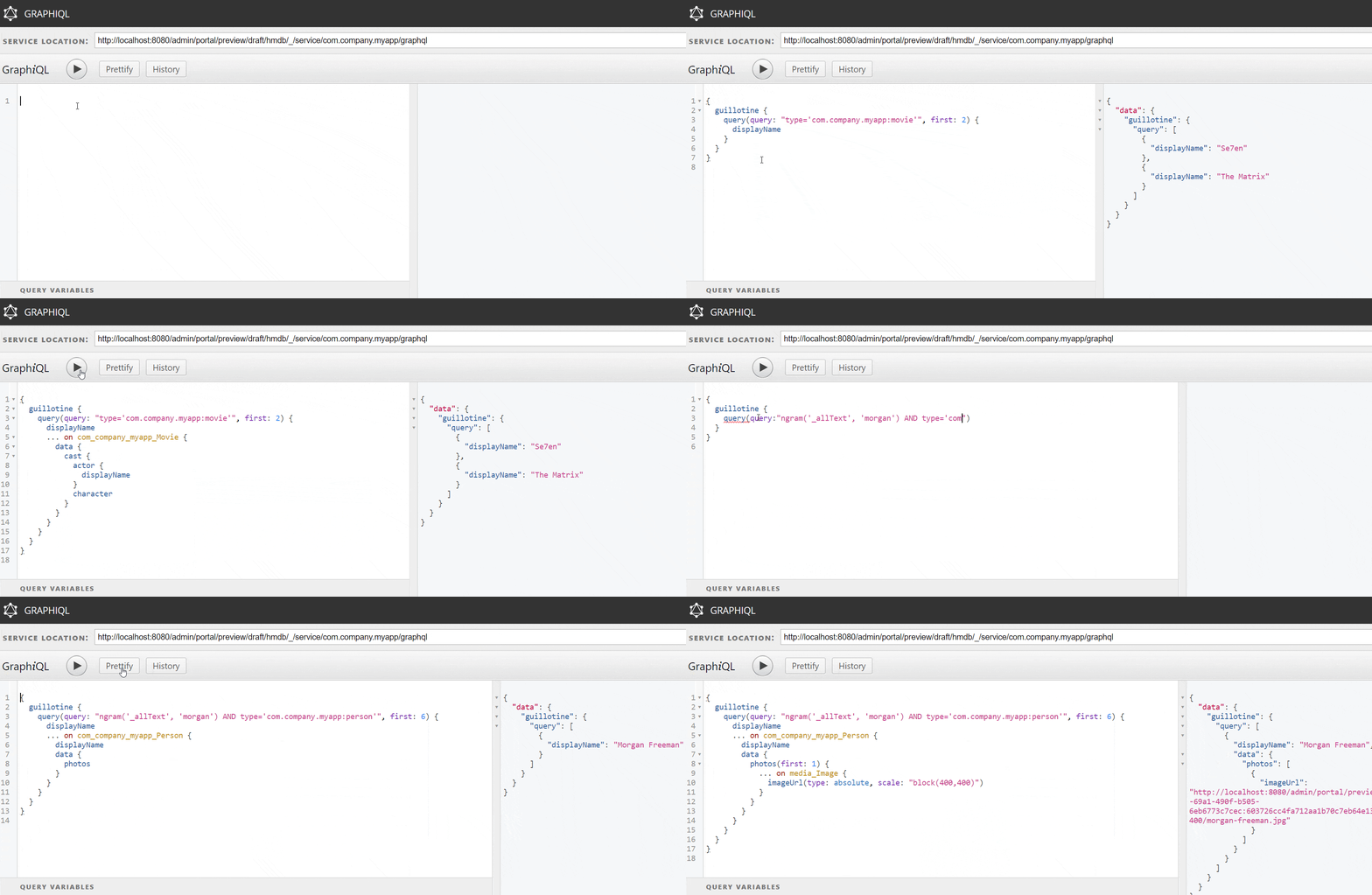
In other words, a great headless API based on GraphQL lets you instantly access your data from any device or client. It should give you exactly what you need and nothing more with a single query. Such an API can even be customized and extended to meet your specific requirements if your headless CMS support this.
REST
REST has been employed throughout the software industry and is a widely accepted set of guidelines for creating stateless, reliable web APIs. A web API that obeys the REST constraints is informally described as RESTful. RESTful web APIs are typically loosely based on HTTP methods to access resources via URL encoded parameters and the use of JSON or XML to transmit data.
Do any of these keywords, such as scalability, independent deployment, web APIs, JSON, and XML, sound familiar? That is because RESTful APIs are another helpful technology empowering great headless content management systems.
The drawback with REST compared to GraphQL is that the front-end and back-end developers need to cooperate to implement the exact API needed by the front-end. The GraphQL approach just exposes everything, letting the front-end developer fetch whatever is needed.
Front-end Frameworks
While it is true that a headless CMS essentially consists of a database, an authoring interface, and an API, this is of course not the whole story. One of the drivers behind the headless success story of the past years is the ability for front-end developers to work freely with their favorite tools and frameworks.
Front-end frameworks allow developers to build the structure, design, behavior, and animation of all on-screen elements of websites and apps. They have become immensely popular in recent years, certainly due to JavaScript being a part of the core web technology, together with HTML and CSS.
A headless CMS communicates with a front-end framework through APIs, so make sure to research the API support when considering your next CMS.
Some Popular Front-end Frameworks
There is almost an endless selection of front-end frameworks to choose from when it comes to building your headless solution. In the following we will present some of the most popular alternatives.
Next.js
Next.js is an open source development framework built on top of Node.js. It enables React based web applications functionalities such as server side rendering and generating static websites. Next.js solves common requirements such as routing, data fetching, integrations, and static generation.
By moving all coding to an external framework, it’s easier for developers to build CMS driven websites in the same way as building pure web applications. This also requires less CMS specific training. This solves a major hurdle for digital projects: Access to developer resources.

Nuxt.js
Nuxt.js is a free and open source JavaScript library based on Vue.js, Node.js, Webpack and Babel.js. Nuxt is inspired by Next.js, which is a framework of similar purpose, based on React.js. Nuxt.js enables developers to build Server Side Rendered applications. A Node.js server delivers HTML to the client based on Vue components, rather than running JavaScript on the client side.

SvelteKit
SvelteKit is a full stack framework where the page is rendered server side on your first visit, but subsequent pages are rendered client side. SvelteKit gives you levers for your pages to use any of these rendering methods.

React
React is an open source, front-end JavaScript library for building user interfaces or UI components. It is maintained by Facebook and a community of individual developers and companies. React can e.g. be used as a base in the development of single page or mobile applications.
Angular
Angular is a TypeScript based free and open source web application framework led by the Angular Team at Google and by a community of individuals and corporations.

Vue.js
Vue.js is an open source model-view–viewmodel front-end JavaScript framework for building user interfaces and single page applications. It was created by Evan You, and is maintained by him and the rest of the active core team members.
Important Things to Consider in a Headless CMS
Choosing the right headless CMS for you, your team, and your organization can be a daunting task. But it does not need to be impossible. Here are some key factors you should consider in your procurement process.
Infrastructure and Technology
A future proof headless CMS uses modern technology and is open to integrate with best of breed tools. Which means providing flexible APIs, being agnostic to front-end frameworks, and use cloud services for smart scaling. It also generally means to be compatible with tools for authoring, marketing, and analytics.
This modular infrastructure ensures that the headless solution not only solves current day challenges, but that it also is flexible and agile enough to adapt to future issues.
Carefully consider the needs of your organization. Most may be happy with a solution delivered as a service (cloud solution), but your organization might have requirements for hosting in your own environments. If this latter alternative applies, be sure to research headless vendors thoroughly, as not all of them can offer software to be self hosted.
The must for any headless CMS is a comprehensive and flexible API to gather, create, and maintain content. If you must customize or build APIs tailored to the requirements of your organization, ensure that the CMS supports it.
Developer Ecosystem
Developers are the primary target group for a headless CMS. They want to know how the CMS fits into the organization’s existing digital portfolio and frameworks, as well as all the fine details of the solution itself.
Developers also like to engage in communities, where they can receive and deliver help, as well as showcase their solutions built with the headless CMS. An active community, together with a professional vendor based support system, will make your developers happier.
Additionally, you have to educate the staff that are going to use and run the CMS for years to come. Letting developers and editors go through training on the headless solution will save your organization time and money in the long run.
Finally, the headless CMS of your choice should have an ecosystem with ready made integrations and extensions. This might include libraries for developers, integrations with other systems, and extensions to the CMS.
Easy Content Production
It is tempting to listen to the standing ovations from developers when it comes to the excellence of headless CMS. But don’t forget the other group that is supposed to work within the solution on a day to day basis: The content editors.
Ask yourself how long it is going to take for the content team to understand the headless CMS in order to maximize productivity. The authoring interface of a headless CMS should first and foremost make your content editors productive and effective.
Many first generation, cloud native, and “pure” headless CMS solutions offer the dreaded database and form based editing—and not much else out of the box. Indeed, the content itself should be at the center, but editors like to see and feel how their content will be presented. Just like a film director likes to see and hear his movie on the silver screen, as opposed to the same story in a script.
In other words, you should make sure the selected solution can compose content within an contextual preview (together with both visuals and services). At the same time it should be responsive, offer a logical overview like a tree structure, and support workflow and permissions. Also, reusing content—the staple of headless—saves both time and resources.
Security and Reliance
A headless CMS provides improved security by reducing the number of exposed components available to end users. Entry points for malignant visitors are limited when just a few parts of the solution are visible. This security feature is boosted even further if the vendor uses a static site on a CDN (content delivery network).
The only accessible element for end users is several layers removed from critical components. The process of creating content to deploying it involves a lot of moving parts, and in traditional content management systems this often created a vulnerable back-end.
With a headless CMS, the creation and delivery of content are always separate processes. This makes it exceedingly difficult for end users to access the back-end of your solution. Indeed, the flexibility of a headless CMS allows for even tighter security through a cloud based update regime. With a modular architecture, you can schedule updates and maintenance with little to no downtime.
Keeping your content and customer data safe should of course be one of your highest priorities. Consider the requirements of your organization to where data should be stored, who has access, and the security certifications of the vendor. You should also make sure that the vendor regularly tests for security issues, and quickly deploys updates and security fixes.
The reliability of a headless solution rests on multiple factors, including what happens to your digital experiences during and after maintenance. Also, as part of a reliability assessment you should verify the vendor track record through documentation, community feedback, and analyst reports.
As a last note in this section, make sure that your chosen headless CMS supports your development process and provides several environments—for e.g. testing, staging and production.
Use Cases
If it is not entirely clear what you can use a headless CMS for, use cases can help both you and senior stakeholders at your organization. These examples can help you understand the concept and how it can translate to business value.
Native Apps
Native apps were the initial driver for the rise of headless CMS. A traditional CMS is completely unfit to deliver content for an app, while a headless CMS does the job. Headless is the ideal choice when your iOS or Android app has content that you need to update regularly. Here the headless CMS also enables content management functionality like image handling, workflow approvals, publishing dates, and taxonomy.
Web Apps
Web applications can be a headless use case because they do not need to be especially content driven. An online bank app, for instance, might require custom code and back-end integrations, and developers would not build such a thing with a traditional CMS. However, the app still needs content management for help text, labels, images, and localized content, and this is where a headless CMS can deliver.
Website
Even traditional websites can be made with headless CMS, and making both the front-end developers and the content editors happy while at it. Firstly, the developers can create the design, functionality, and services with their preferred framework. Secondly, the business users can focus on the content itself and not all the glitter and gold.
But—and this is important—a headless CMS doesn’t need to be a pure database for the editor. Some vendors deliver what we term “next gen” headless CMS and deliver additional and optional features, like a tree structure, URL handling, visual page editing, and contextual previewing.
Even the developers get something extra, in the form of a back-end where they can develop and deploy code to customize APIs and run scheduled tasks, as well as other integrations.
Documentation
Documentation is any communicable material that is used to describe, explain, or instruct some attributes of an object, system or procedure, such as its parts, assembly, installation, maintenance, and use.
Basically, a documentation site acts like a kind of encyclopedia, with low requirements within fancy landing pages, and high requirements within updated and structured content. Sounds like a perfect match for a headless CMS.
eCommerce
Due to digital transformation and changing consumer behavior, eCommerce has fully entered the world of B2C. Shopping is now as intrinsic an experience in social channels and IoT as in websites, and traditional retailers are under pressure to adapt to the new shopping reality.
Headless CMS adds value to eCommerce by enabling editorial content and landing page management related to your product offerings to deliver a complete shopping experience.
Editorial Database
Sometimes you just want a sub group of editors to do a specific, limited task—like updating health treatment recommendations or a judicial regulation. Here you don’t want to let the editors into the core CMS out of security reasons or for lack of proper training. Thus the need of a specified knowledge base.
In our example, the editors only need access to edit certain parts of your content, and not the entire website. With headless CMS this can be solved by configuring the types of content you need, and exposing it to the website or any other required channel through your API.
Challenges
As with most things in life, headless CMS comes with both pros and cons. We have discussed a lot of the benefits of a headless CMS, but what lies on the flipside? Are there any real challenges?
A pure, first gen headless CMS usually cannot:
- Use a visual landing page editor
- Organize the website structure
- Manage URLs
- Preview the content
- Manage user rights and permissions
- Manage SEO
- Handle complex image editing
Also, for each new client, the developer must handle several issues, including:
- URL handling (again)
- Formatting issues and templating
- Caching and lazy loading
- Permissions
- Error handling
- Synchronization between CMS and clients
- “Forced” updates from the cloud vendor
Depending on the vendor and the choices you make in the digital project, more custom development might also be required if you use the headless approach for traditional websites. And because many headless solutions are cloud based, hosting software yourself may not be an option.
Let us go more in depth on some of the challenges. Note: These vary from vendor to vendor, and whether or not they offer the possibility of a next gen CMS, i.e. combining the lightweight benefits of headless with an optional, but powerful addition of editorial tools.
Preview
As editors work in a database and not on an actual website, they don’t really know where the content will go or what it will look like before publishing.
However, developers can in fact create a standard preview for a quick reference, easing the content editor’s state of mind. Just remember that the preview might not look exactly like its final presentation on every channel.
Tree Structure
Many headless vendors do not offer a hierarchical tree structure overview of the content. This type of navigation is familiar from operating systems, and allows the user to browse through content by opening and collapsing child content items under a parent content item.
As mentioned before, a headless CMS is more or less a database. Organizing content or achieving a tidy overview may become difficult in larger projects based on such a standard database viewing.
Developer Driven
One grand challenge with headless CMS is this following fact: The content editors simply didn’t ask for it. What content editor dreams of creating and maintaining content in a form based database only?
Headless CMS is primarily developer driven. The decoupling between the content layer and the presentation layer makes for more fun and agility for developers, but poses a real challenge for content editors. This is due to especially first gen headless limits on what such users can do and customize within the platform.
Hosting and Security
Most pure headless vendors offer their solutions as a SaaS, meaning you log into a cloud service to edit content. With this comes the advantages of cloud hosting in the guise of blazing speeds and cloud scalability for traffic peaks.
But not all headless vendors are alike. Hybrid vendors, for instance, offer a variety of hosting solutions. Some are SaaS, while others may be PaaS or even on premise. The general trend is however that more and more vendors are moving to the cloud for increased user experience and speed. Because most headless solutions are cloud based, hosting software yourself may be off limits.
If your project involves rich web content, URL handling, extensive editorial requirements, special hosting needs, and reuse across different channels, a next generation headless CMS might be the solution you're looking for.
More Code to Maintain
The developer first approach of headless CMS may actually involve more hard coding from the developers, and content editors are more dependent than ever on what the developers have taken into account. There are possibilities for hard coded custom switches and complex configuration, but this makes the platform more advanced than necessary.
In some headless cases the developer has to do all the heavy lifting—including building and maintaining a larger code base. As a pure headless CMS is only an API, creating a full website can pose a real challenge.
Furthermore, much practicality must be managed—like URL handling, deep linking, and error handling. Depending on your choices, a first gen headless CMS might actually lead to higher complexity, by moving from one system to multiple in order to handle various tasks.
Add to this that all the different systems must be integrated, synchronized, and managed, and you have a head scratcher.
***
Many of these challenges with headless CMS can easily be overcome by researching and choosing the right solution for you. Some vendors have taken these factors into account, and offer a next gen alternative: Taking in the best of both worlds by unchaining the developer and enriching the editor.
Pricing Models
The cost of a headless CMS can be difficult to estimate, due to the often obscure nature of SaaS vendors together with the request based pricing model.
What you need to ask yourself is what the projected lifetime cost of the system is, and whether it will provide ROI in the long run. Ensure that you know how your preferred solution is priced (just ask the vendor), what factors drive cost, and what the estimated lifetime cost of the solution is.
Don’t be fooled by promises of honeyed rivers. Headless CMS can initially be cheap, but once the traffic picks up you must flex your golden muscles. The price tag is frequently based on requests, and developers can inadvertently double the number of requests by courtesy of their specific code.
Popular headless solutions are for the most part on price parity with traditional content management systems. And, depending on your choice of vendor, you might require additional solutions to the pure database. This can for instance be solutions for presentation, and this must also be included in the calculation.
On the other side, a next gen headless CMS with additional capabilities includes an optional presentation layer for websites, which eliminates a part of the multiple solutions factor from the price calculation.
Closing Remarks on Headless
Headless CMS makes sense in a world where you don’t necessarily know where your information will be presented tomorrow. The combination of a database + an API for distributing to any channel is unbeatable.
As we have seen, headless CMS is not without its challenges. However, we believe these can be overcome with smart strategies like the involvement of next generation capabilities.
Content is essentially data. Having a method for treating data easily and predictably will not grow old or stale. It’s in the very foundation of communication. The question is to what degree headless CMS will come closer to what it initially distanced itself from: The traditional CMS.
We believe that flexibility will be the key ingredient for successful vendors in years to come. The flexibility to choose the components you need to please both developers and content editors at any time, in a constantly shifting environment.
Bonus: Headless CMS Explained for Marketers
Headless CMS is by its nature a very technical concept, and it can be tricky to get your head wrapped around it. Here we will try to explicitly explain the concept for non-technical people, why it came to be, and what it means to you.
Background
There are three interconnected factors that helped give rise to headless CMS: DXP bloating, omnichannel, and technological development.
DXP Bloat
Many content editors will probably be familiar with slow and too-big-for-their-own-good DXPs, with one million features and an accompanying glacial speed. The stage was ripe for a lightweight and super fast CMS to replace the current over encumbered ruler.
Omnichannel
The second factor, omnichannel, should be equally familiar. Anyone not living under a rock has taken note of the influx of a horde of digital devices and channels the last couple of decades.
The personal computer isn’t alone anymore. Now it has the company of mobiles, smartwatches, doorbells, speech assistants, in store beacons, and things we haven’t dreamed up yet. So, how does one consistently deliver content from one source to one million different channels?
Technical Development
The third factor, technological development, is probably more obscure for mere mortals. In short, we have seen innovations within rich front-end frameworks. What are these, you ask? Front-ends are what decides the logic, structure, design, behavior, and animation of on screen elements.
And this technology has improved so much that developers prefer to build their digital solution with their favorite framework. And this fits perfectly well with the headless technology, as we shall see.
What Is Headless CMS?
Headless CMS appeared on the stage to solve three challenges: bloating, omnichannel, and the developer’s newfound love with his favorite front-end framework. What is the nature of headless CMS to cater to these things?
First off, let’s see what a headless CMS is not. A traditional CMS certainly isn’t headless, and it locks content together with design and functionality. You write some lines into the design of a landing page, for instance. Now try to translate that visual landing page into your speech assistant, IoT, or wearable. Impossible.
What headless CMS does is to separate content and design/functionality—a.k.a. presentation. The text you wrote and the image you inserted into forms can now be pulled out at will and be displayed via something called APIs in various channels.
This includes the good ol’ landing page, smartwatch, and digital signage. For instance, it makes sense to show all the content on the web, show only text on a wearable, and the visual elements on digital signage. And all from the same source!
Still hard to understand? Let us provide some useful analogies:
Imagine if every engine were inseparably linked to its car. The engineers and mechanics couldn’t use the principles of a V8 engine from an Aston Martin Vantage in an Aston Martin DBS Superleggera.
They would have to create it from scratch as a whole new engine. But luckily, the engine (content) is the same in several different cars (presentations), enabling economic efficiency.
Or this: Imagine if the text of a novel were inseparable from the first physical copies made of it in hardcover. That would make pocket editions, collector editions, digital editions, and so on impossible. Luckily, the content is in reality separated from the presentation also here.
What It Means for Business
OK, so a headless CMS separates content and presentation. It lets us distribute the content to all our marketing channels (and beyond), while simultaneously ramping up the performance with blazing speeds. Sounds good so far, but there’s more:
- Improved quality: Your content creators can now focus first and foremost on the content itself, and not on its particular visual organization on e.g. a web page. The single source of truth can also enable tone of voice consistency across channels.
- Saving time: Reuse the same content in different channels, instead of having to multiply your efforts. Also, there will be no more wrestling with design elements and page setup (let the developers do the wrestling!).
In sum, headless CMS enhances your omnichannel presence, speeds up your offerings, improves your content quality, and saves your team time (and money).
In total, these factors should contribute to improving your digital customer journey, which creates more and happier customers, which is something business execs understand and appreciate.
Chapter 6
Composable CMS
The emergence of composable architecture heralds an exciting era for CMS.
Digital businesses deliver content and services in different ways, but the particular alternative of ‘composable’ seems to steadily carve its way to the throne. The advantages? A more flexible way to handle requirements and technological innovations—now and tomorrow.
The CMS industry has bounced between monolithic and decoupled systems, each with its strengths and limitations. However, the growing need for agility and integration of digital technologies has led to the rise of a new heir apparent: the composable CMS.
Distinct from other CMS types, a composable CMS stands out for its promise to satisfy two groups which historically have been at odds: the content editor and the developer.
Why Care About Composable CMS?
In today’s rapidly evolving digital landscape, it is essential to adopt a system that can keep pace with technological advancements and market demands.
This is where the concept of a composable CMS comes into play.
But what exactly makes it so crucial for developers, content editors, and business advisors? Why should organizations care about transitioning to a composable approach?
Accelerating Development and Innovation
A striking prediction by Gartner underscores the potential of composable architectures. By 2023, organizations that had adopted an intelligent composable approach were expected to implement new features 80% faster than competitors sticking to traditional suites.
This staggering difference in speed and agility highlights a critical competitive edge. Keeping up with competitors is just the beginning, as the real impact will come to innovation and user experience.
Headless CMS has been “just another service” in the modern stack and has proven to be suboptimal for websites. Composable CMS, on the other hand, caters to the whole organization by bringing back flexibility for all teams and departments.

Enhanced Agility and Separation of Concerns
Composable follows the headless tradition of separating presentation from content, but with the added bonuses of a more visual editing experience for content editors and the factor that makes a CMS composable: The integration and orchestration of third party services and custom APIs.
This approach enables a welcome separation of concerns. Now front-end developers can work with their preferred tools and dedicate their focus purely to the user experience (UX). Meanwhile, other teams can leverage the division of labor to efficiently handle their respective domains, be it visual content management or back-end development.
Embracing Omnichannel Strategies
In a composable architecture, the core philosophy is to build solutions using the best components from their respective fields. This includes eCommerce, analytics, front-end, CRM, and marketing automation.
The composable approach aligns perfectly with omnichannel strategies. Here the goal is to provide a consistent user experience across various touchpoints. A composable CMS is the perfect match by offering an orchestration layer, ensuring that each aspect of your digital experiences is optimized, leading to a more cohesive customer journey.
The Bottom Line
So, why care about composable CMS? It’s about rapidly adapting and innovating in a digital environment that never stands still. It’s about ensuring that different teams can work in their areas of expertise without bottlenecks slowing down the process.
Most importantly, it’s about embracing a front-end agnostic approach with a CMS capable of managing websites and orchestrating content delivery and integrations. For developers, content editors, and business advisors, composable CMS represents a future proof solution that promises speed, efficiency, and a competitive advantage.
Historical Background
The history of CMS has been marked by a constant tug-of-war between the needs of editors and developers. This ongoing struggle has shaped the evolution of CMS technologies, leading to the rise of composable CMS.
The Traditional CMS: Editor-Friendly, Developer-Restrictive
In traditional CMS systems like suites and digital experience platforms, the focus was on the content editor. These systems provided a user-friendly environment with access to templates, visual editing tools, and an intuitive interface.
However, this editor-centric approach often left developers constrained. They faced restrictions due to the tightly coupled nature of the CMS and front-end, limiting their ability to use their favorite tools.
The Emergence of Headless CMS: A Developer’s Relief
The introduction of headless CMS marked a significant shift. By decoupling the front-end from the CMS, developers got more flexibility to use their preferred frameworks.
This freedom, however, came at a cost for editors. The user-friendly environment gave way to form editing, with limited options for visual editing, tree structures, previews, and URL management.

Modern Stack Solutions and Limitations
With modern stack solutions that employ headless CMS, the CMS is often reduced to “just another API.” This diminishes its role and practical use cases, which creates challenges for both editors and developers.
The limitations of headless CMS has increasingly become more apparent, and neither traditional nor headless systems seem to ideally cater to the entire digital team within an organization.
Content Federation: a Middleware Solution
Content federation platforms have emerged in an attempt to save organizations stuck in legacy CMSs. They offer page builders linking to content in your existing CMSs and other data sources, acting as an integration API gateway. This allows for building modern stack solutions without replacing your legacy CMS.
However, this middleware approach introduces another layer of complexity. The content federation platform itself represents yet another cog in the machine, requiring updates and maintenance. For editors, it means inefficient workflows, often having to switch between the content federation platform and their CMS, not to mention difficulty in keeping track of what is used where.
Composable CMS: the Ideal Solution
Addressing all of these challenges, composable CMS enters the scene. Unlike a headless CMS, composable CMS recognizes the crucial role of CMS in creating websites and other content savvy digital experiences.
It combines the functions of headless CMS, traditional CMS, and the API gateway of middleware, offering both the editorial functionalities (like tree structure, in-context preview and visual editing), as well as the front-end agnostic and integration capabilities needed by developers.

Defining Composable CMS
At its core, a composable CMS is, first and foremost, a content management system—designed to manage digital content. Like all CMSs, it serves the primary function of creating, managing, editing, and publishing digital content.

What Sets Composable CMS Apart
The unique characteristics of a composable CMS separating it from all the other types of content management systems, can be understood through its historical context and its contrast to traditional and headless CMS models.
- Decoupled Architecture:
Drawing from the headless approach, a composable CMS also features a decoupled architecture. This means that the content management back-end is separated from the content presentation layer. - Integrations:
A composable CMS can seamlessly connect with various other systems and tools. This allows teams to orchestrate a cohesive digital ecosystem, integrating or delivering services with less code. - Enhanced User Experience for Editors and Developers:
Addressing the historical trade-off between the needs of editors and developers, composable CMS offers solutions that satisfy both. Editors enjoy a user-friendly environment with advanced editing tools, while developers benefit from the freedom to use their preferred technologies and frameworks.
The Comprehensive Definition
Now we are ready for our essential definition of a composable CMS:
A composable content management system organizes the creation, modification, and publication of digital content, and orchestrates the integration between services, content, and presentation.
Composable Architecture vs. Composable CMS
The composable concept is a response to the limitations of previous architectures. As such, a composable architecture refers to a system where every component is pluggable, scalable, replaceable, and can be continuously improved—including the CMS.
Driven by modern API and SaaS trends, this architecture enables organizations to build richer digital experiences more efficiently than traditional stack approaches. It represents a shift from monolithic software suites to a focus on API-first approaches, allowing organizations to choose best of breed solutions from various vendors.
With this in mind, the term ‘composable architecture’ reflects the system as a whole. It is about using various front-ends, APIs, and services in tandem and focusing on the end result.
A CMS is a natural part of a composable architecture. To fit into a composable architecture, the CMS must at least offer headless capabilities through a web API. A composable CMS is simply a CMS that in itself is built with a modular and customizable architecture, a true platform, opting for even more flexibility.
Beyond Headless
At its essence, a headless CMS is primarily focused on managing and delivering structured content through a web API. This ‘headless’ approach, devoid of a front-end presentation layer, has been a game changer in allowing content to be served seamlessly to various front-end clients.
However, this model often falls short in areas like intricate content organization, where tree structures and visual editing are essential for more sophisticated content management needs. The evolution into a composable CMS begins when these limitations are addressed.
Unlike the headless CMS, a composable system is not just about serving structured content to a separate front-end. Instead, like a traditional CMS it is fully equipped for the management of complete websites, including custom capabilities and modules that go beyond editorial content. This capability represents a significant leap, turning the CMS from a mere content repository into an integral part of the digital experience.
Traditional CMSs could typically sport a multitude of functions. These included form builders, reviews, and several other features lost with the more lightweight headless systems. With composable, these functions can be built into and integrated with the CMS.

Enhanced Capabilities and Flexibility
A composable CMS offers unmatched flexibility, especially in integration, blending various technologies to create a cohesive digital ecosystem. This adaptability is key, allowing the system to meet diverse technology and user needs.
For example, in a healthcare organization, a composable CMS is not limited to managing different content types, from health articles to patient tutorials. It can for instance integrate with medical databases and back user interaction like polls and feedback.
This facilitates not only efficient content management but also a richer, more engaging user experience, enhancing patient education and access to healthcare services.
The Holistic Approach of Composable CMS
A composable CMS represents a holistic solution in the realm of digital content management. It surpasses the headless model by not only enhancing the creation and management of reusable structured content. It also focuses on the end user experience and other requirements and tools to build engaging websites.
Examples of projects that may benefit from both cost and management perspectives are: a marketing team creating landing pages and personalized messaging, an eLearning company blending tests, search, and editorially managed content and navigation, a content-savvy organization curating a digital archive and their website from a single interface, or an eCommerce team controlling landing pages, hierarchies, and editorial content seamlessly integrated with their products.
Its flexible approach makes the composable CMS an invaluable asset in crafting immersive and interactive digital customer journeys. It effectively bridges the gap between services, content management, and front-end presentation.

Key Elements of a Composable CMS
A composable CMS is characterized by its versatile and multifaceted nature. Now we delve further into the key elements that collectively define what a composable CMS is and how it functions in the digital ecosystem.
Web API: The Communication Backbone
Central to a composable CMS is its web API, often utilizing GraphQL or REST. This API acts as the communication backbone, facilitating interactions between the CMS and various clients or services. It allows for efficient data retrieval and management, ensuring that the CMS can seamlessly integrate and communicate within a diverse digital landscape.

Content Reuse
In a composable CMS, content reuse is a fundamental feature. This allows for the same piece of content to be utilized across different channels and platforms, enhancing consistency and reducing duplication efforts.
Content Aggregation
Alongside reuse, content aggregation can be achieved by delivering content from different sources through a single API.
Advanced Search
The search functionality of a composable CMS is designed to be robust and versatile, catering to complex content queries and organization needs. This advanced search capability improves content discoverability and organization.
Client Diversity
Additionally, the ability to cater to different clients—from web and mobile apps to IoT devices—is a hallmark of a composable CMS. It ensures that content delivery is adaptable and responsive to various platforms.
Rich Text
Rich text handling is another crucial element, providing content creators with powerful tools for text editing and formatting. This feature is essential for crafting engaging and visually appealing content.
Page Composition
Complementing rich text is the page building and composing capability, which allows for the intuitive and dynamic assembly of web pages. This functionality enables users to design and structure web pages with ease, using drag-and-drop interfaces and a variety of templates and components.
System Overview and Dependencies
A composable CMS provides a clear overview of usage and dependencies. This includes understanding what clients are fetching which data and how different content elements relate to and depend on each other. This insight is crucial for managing complex content structures and ensuring consistency and accuracy across the digital ecosystem.
Localization
Localization features cater to different languages and markets, allowing businesses to reach a global audience with tailored content.
Media Management
Media and image handling capabilities ensure that various media types are managed efficiently and optimized for different platforms, ensuring high quality content delivery.
Customizability
The API of a composable CMS is designed to be customizable, aligning with specific business requirements and data structures.
Event Handling
Event handling is also a key component, enabling real-time updates and interactions based on user actions or system triggers.
Cluster Management
For large-scale operations, features like cache invalidation, notification systems, and job triggering are managed both locally and across clusters. This ensures high performance and consistency in content delivery and system operations.
Interface Customization
The back-end interface of a composable CMS is customizable, enhancing usability and efficiency for different user roles.
Integration with Third Party Systems
Integration with third-party systems, such as analytics and SEO tools, is seamless, making the composable CMS a part of a larger digital ecosystem. This integration extends the functionality and efficiency of the CMS, making it a versatile tool in digital content management.
Hierarchical Content Organization
Finally, the ability to manage content in hierarchical tree structures is a significant feature of a composable CMS. This functionality aids in organizing complex content in a navigable and logical manner, crucial for large-scale content strategies.

Use Cases
The composable CMS is becoming an indispensable tool in modern digital strategies, offering a balanced solution that caters to the entire digital team within an organization.
How can composable CMS best be used by different organizations in different industries? Let’s take a look at some use cases.
Marketing and Websites
Content teams and websites have in many ways been left behind in the developer driven headless craze, but composable CMS steps in to rectify that mistake.
With composable, more or less “traditional” teams, projects, and sites still receive all the benefits from headless CMS, like fast loading, modern user experience, consistent brand and messaging, and developers using their favorite tools and front-ends.
But here’s the sweetener: Content editors and marketers still get to keep the control known from traditional CMS. They can manage tree structures and landing pages, all seamlessly integrated with their favorite marketing tools.

Content Savvy Organization
Beyond traditional marketing websites are the organizations that must handle enormous amounts of complex content, like the financial services industries or the healthcare sector.
These content savvy organizations can use a composable CMS to orchestrate structured content, integrations, and more regular website management.
Whether it's support for an API making their content available for third parties, an integration with a legal text service, or flexible content management, a composable CMS will cover the ground for demanding content teams with an equally demandning industry and subject matter.

Self Service
Imagine a healthcare provider using a composable CMS to integrate various health related content, patient education materials, and interactive tools.
The CMS could seamlessly connect medical databases, editorial content, and customized interactive services, allowing for the secure and efficient presentation of relevant patient health information. The bonus: Everything created can be reused in other channels and services.
The CMS’s ability to handle diverse content types—from health articles and video tutorials to patient testimonials—not only enriches the patient experience but also ensures that information is accessible and engaging. At the same time, everything is orchestrated from a single, intuitive interface.

eCommerce
The realm of eCommerce has also gotten onboard the headless bandwagon, often backed by a headless commerce platform. The same benefits from composable architecture also apply here: blazing speeds, omnichannel presence, front-end agnosticism. All in all greater user experience and flexibility.
However, the same headless challenges apply as well, and that’s why eCommerce companies should put a composable CMS on the top. This setup provides a plethora of flexibility, letting you sew it all together with APIs.
Composable commerce is a sturdy and secure bridge out of the monolithic eCommerce platforms. Composable CMS can orchestrate the customer experience, contributing with everything from landing pages, search, and ratings, without stepping deep into the eCommerce company’s logistics and pricing systems.
Media and Publishing
Historically, the media and publishing industry have already sported reusable content and separate front-ends. This was due to their nature as a multichannel offering long before it became fashionable, first in the form of physical vs, digital content, then in the form of desktop vs. mobile, not to mention reuse across different publications.
Headless has been a natural progression for media corporations, with all the expected and already mentioned benefits. However, with composable CMS added to the mix, journalists and editors can orchestrate different kinds of content and structures beyond the articles, all while having their content fully reusable.

Apps
The development and management of apps have had a most natural relationship with headless CMS since it was technically possible.
A composable CMS can deliver content and other interactive aspects that reside outside of the application’s core functionality, acting like a management back-end for the application. This can for instance be handling feedback or managing translations.
In other words, composable CMS can be used to build custom back-end functionality and admin interfaces to let companies operate their applications in an even more efficient manner.

Embracing the Future with Composable CMS
It’s clear that composable CMS represents a significant evolution in digital content management. The journey from traditional, editor-centric CMS platforms to the more developer-friendly headless CMS, and ultimately to the uniting composable CMS, highlights the industry’s ongoing efforts to balance the needs of editors, developers, and end users.
The emergence of composable CMS as a holistic solution addresses the historical limitations of its predecessors. It transcends the headless model by not just delivering structured content through APIs, but also by empowering the customer journey. The ability to integrate a myriad of services and technologies makes it a cornerstone for building sophisticated digital ecosystems.

Looking to the future, the prospects of composable CMS are promising. As digital technologies continue to advance and user expectations evolve, the flexibility of composable CMS will become increasingly important. Organizations can expect to deliver more dynamic, adaptable, and user-centered digital experiences, driven by the integration and management capabilities of composable CMS.
In essence, the composable CMS stands as a beacon of innovation in digital content management. As we move forward, the role of composable CMS in shaping digital experiences will undoubtedly grow, making it an indispensable element of any forward-thinking digital strategy.
Chapter 7
The Future of CMS
We now know what a content management system is and what you could do and should do with it. But where is the CMS headed? What is the future for the technology? Let’s have a brief look at the past before we delve into the future.
Brief History of CMS
In the 1990s most organizations and persons with an online presence made their websites by hard coding static HTML pages. By the late 1990s, progress in programming languages let editorial teams edit content on their own websites. This paved the way for the birth of the content management systems.
A CMS allowed users to write, copy, upload images and publish to the web without being especially knowledgeable about technical stuff. Most organizations wrote their own custom CMSs. However, the era also witnessed the advent of the commercial CMS, where a company sold a supported CMS to other organizations.
In the early 2000s, several open-source CMSs began to appear. They increased in popularity together with the commercial, proprietary CMSs all the way up to the present day.
Then, in the late 2000s and early 2010s user needs changed. It went from being able to produce and publish on the web to include more rich marketing abilities and features. As well as addressing the issue of multichannel presence.
This is where we are today.

What Comes Next?
The development of content management systems has certainly not been standing still since the 1990s, but what can we expect for the next decade?
Cloud
Historically, local deployments have dominated the CMS arena. With the rapidly rising popularity of cloud, CMS vendors have started to offer their software as a service (SaaS), effectively reducing the complexity of deployments and hosting. As a result, vendors that have previously been pure software companies are now offering their solutions as a service.
Be careful when choosing your solution, as proprietary cloud only offerings will lock you in compared to software based solutions and especially open source systems.
Headless
The future of CMS will still remain closely aligned with the web. However, the number of devices and interfaces we use to consume and interact with content has exploded. Social media, apps, watches, speech interfaces, virtual and augmented reality, and digital signage are just the tip of the iceberg.
There are numerous ways to feed these sources with content. But for any organization looking to provide consistent content across channels, the answer is summarized in three letters: API (application programming interface).
Content served through APIs will primarily be structured (like in atomic content design). This means that layout and actual presentation needs to be handled by each client and device.
Clients must be able to retrieve content through well defined APIs, and we can expect to see many different styles of APIs – but web based APIs will dominate completely.
The niche area within the world of CMS is known as headless CMS, and the number of players focusing on cloud first headless CMS has exploded. Traditional CMS vendors are also providing web APIs for their content, and this is often referred to as a decoupled approach.

Beyond CMS
The riveting technological development of the web, in both software and hardware, leaves a lot of uncertain factors about the immediate and the more distant future of CMS.
But this seems to be fairly certain: Several CMS vendors have moved beyond simple web content management, and many already offer a wide range of marketing tools or integrated marketing suites.
Players in this complex game include Sitecore and Adobe, and their offerings may be labeled as “digital experience platforms.” These kinds of comprehensive solutions seek to manage, deliver, and optimize the end user’s digital experience across a variety of platforms and channels, like social media apps, watches, speech interfaces, and so on.
In these marketing package solutions we can observe an increased focus on tools for personalization and dynamic, contextual marketing. As well as marketing automation and continuous optimization of the user and customer experience.
What the future essentially holds for CMS is therefore more than web content management, exemplified by integrated marketing suites and subsumed under the term “digital experience.”
This means a lot of different tools and services, available through several different platforms and channels. And they will aim at different segments of audiences – the right content at the right time to the right people.
You can expect these solutions to be available primarily as cloud based services.
Progressive Web Apps
Ever since Steve Jobs introduced the original iPhone in 2007, the Internet has been divided in how it is presented: Usually this manifests in a brand offering being presented as a regular website in a desktop browser and as a dedicated app on iOS, Android, etc.
This two fold (or x fold) solution has proven both time consuming and resource intensive. Developers basically have had to make the same product twice, thrice, or even more.
The multi platform approach is a waste of time and can be confusing and frustrating for the end users. Why is functionality x present in the desktop version of the website, but not in the app? And vice versa. Wouldn’t it be nice having just one solution working on several platforms and channels?
Enter progressive web apps. A progressive web application, or PWA for short, is a website that is able to function like a native mobile app. This means that the developers make one solution, the editors publishes in one solution, and the consumers receive a consistent experience across devices. A PWA is:
- Progressive – works for every user, regardless of browser
- Responsive – fits any form factor
- Connectivity independent – allows offline work or on low quality networks
- Faster / better performance – capitalizes on the speed benefits of the web
- App like – feels like an app with app style interactions and navigations
- Leaner – much smaller size than a native app
- Fresh – always up-to-date due to service worker update process
- Safe – served via HTTPS
- Discoverable – identifiable as “applications” and allows search engines to find them
- Installable – can be added to the home screen without involving an app store (it is optional to be included)
- Linkable – easily shared via a URL and not requiring a complex installation
Examples of PWAs include Twitter, Tinder, and Debenhams, and the development of the technology is supported by Google, Microsoft and Apple. Several of the early test cases have reported about increased conversion rates, making PWAs a must for any future proof organization.
A CMS for the future should support PWAs. When you are researching your next content management system, make sure it is able to work with progressive web app technology.
Future proofing Your CMS
No matter what CMS you finally go for, there are common technical aspects you should consider in order to make your CMS ready for the future. You have already read several tips throughout this guide, and here are some more:
- Flexibility – your CMS should be adaptable to any kind of need of your organization, either in its core or through integrations
- Support – the CMS should support all designs and types of content you can throw at it
- Image scaling – handling images both in editing and in presentation is no luxury, it’s a necessity in an increasingly mobile world
- Language support – as the web more or less has rendered national boundaries moot, any website or app should offer multilingual support, and the back-end is no exception
- Integrations – having a close relationship with flexibility, integrations are key to staying ahead, as your CMS will not be able to offer everything to everyone. Custom solutions always make their appearances, and a future proof CMS takes this into consideration
- Scaling and performance – whether you run a small association or are a part of a large company, the CMS must grow alongside your traffic and needs. A CMS should offer a robust foundation. You should be able to build and scale elements in the system seamlessly, as well as making sure the overall performance of the system is kept smooth
You can also read our guide on how to future proof your digital experiences in order to gain a more complete understanding on the steps you should take toward the future.
Chapter 8
CMS Alternatives
Now, near the end, an important question arises: what CMS should your organization choose? There are literally hundreds out there, so how do you orient yourself in this seemingly confusing maze?
One obvious starting point is the list of content management systems on Wikipedia. This list is quite technical and is primarily aimed at developers, so be sure to involve your more technical proficient colleagues if you want to read it closer.
Another tactic in your strategy to find a suitable CMS is to use Google and search for keywords you and your team values along with “CMS.” For instance: “headless CMS” or “flexible fast easy CMS”.
Use your time and be patient, do not pick the first nice looking content management system you happen to stumble upon. Note the properties of the different systems and weigh the pros and cons against each other, all according to what your team and organization need and want.

WordPress Versus the World
If you go and check out the statistics of the most popular content management systems, one CMS in particular stands out. You have probably guessed it already: WordPress sits on the CMS throne with a whooping 51 percent of the market share.
What does WordPress offer that makes it so appealing to so many actors across the world wide web? Here are some WordPress features:
- Does not require specialized knowledge about code or web design
- Fairly easy to set up and maintain
- The user interface is easy to understand
- WordPress is both a blog host (.com) and a blogging software (.org), with the former introducing many potential users for the functions they can continue to use if they decide to go for the latter
- Plugins provide a solution to many different needs that WordPress does not offer in its core package
- A sea of different themes lets you handpick the design you want
- Active community keeps the development alive
There is no doubt that WordPress is a popular and user friendly platform, but a whole host of eCommerce sites, businesses, and larger organizations use other content management systems. Why is that? This might be due to WordPress having some shortcomings:
- Security – WordPress offers plugins to do just about anything you can think of, from changing database parameters and altering JavaScript codes to offering SEO tools and email forms. Most of these plugins are developed by third parties, both companies and private persons alike. They pose a threat to the general security of your site in two ways: 1) All plugins have an extra set of codes that can disturb or ruin some function of your website, and 2) All the extra code basically builds new doors to your stone wall that is the core CMS, allowing malevolent actors new potentially weak entryways into your kingdom
- Customization – Although WordPress offers themes, making your website look and feel as you wish, they do not alter the core of the system. WordPress offers little customization in its core functionality, despite the outward appearances and features that you can change with themes, widgets, and plugins. As we have seen, third party elements like themes and plugins pose an unnecessary threat, something businesses cannot tolerate. The lack of customization therefore makes brands and larger organizations choose solutions they can tailor together with dedicated consultants from scratch, fitting their exact needs and in compliance with risk guidelines
Don’t get us wrong. WordPress is an ideal tool for blogs, personal websites, and small scale websites.
But every tool must fit its purpose.
Just as a carpenter would never use a wood screw in a concrete wall or vice versa, you should not select a solution that doesn’t fulfill your organization’s requirements of scale, flexibility, security, performance, and so on in regard to your digital experiences.
Essential Features for B2B, SME, etc.
So, if you work in business to business (B2B) or a small or medium sized enterprise (SME), what should you look for in an alternative to WordPress or your current CMS?
We have written this entire guide explaining just that.
But, since we are the good guys, here are the most important essentials repeated. This is what you should look for in your next CMS:
- Hybrid CMS – Need a traditional or headless CMS? Why not choose both, when (and if!) it suits you, in the form of hybrid CMS?
- Supported – Is the CMS actively supported by the developers or an external agency? Do your research and ask around, they are probably eager to answer your questions.
- Scalable and modular – Try to understand how the CMS works at the core. Will it be able to add functionality and modules, as well as trim off unnecessary parts if needed?
- Responsive – No matter how or when you edit content, you should be able to do it on any device and on any bandwidth
- User friendly – Keep in mind that your CMS should be easily understood and easily handled by your users, with a focus on logical navigation, accessibility functions, and so on
- Marketing friendly – A modern CMS with respect for itself incorporates tools that makes engaging with customers and the target audience easier, namely marketing automation, SEO, personalization, content marketing, and collaboration tools
- Revision and version control – Never lose a day’s work (or a minute’s, for that matter) with revisions and have a full overview of what you show externally on your digital experiences with version control
- User management – Who has access to what? Any CMS that takes risk precautions provides you with a clear overview of users and user privileges
- Future proof – Take an extra look on the developers behind the CMS: Are they an open source community? What frequency is the CMS updated at? Does the developer / vendor / support seem stable and long term? Does the CMS support a long term customer journey? These factors will give you a clue if the CMS is future proof, and therefore worth investing in for you and your organization.

CMS Alternatives for B2B and SME
There are several giant CMSs / WCMs / DXPs out there, like Adobe Experience Manager and Sitecore. These solutions offer tons of features and functionality, and are primarily aimed toward large, multinational corporations that have other needs than small and medium size enterprises.
These needs include a website hierarchy across the globe with content inheritances, large and dedicated support teams, integral advanced analytics, and several other technical considerations.
The segment between private citizens, associations and tiny organizations on the one hand and large, multinational corporations on the other is, however, a notable one. Small and medium sized enterprises and organizations make up a sizable portion of the economy, and often have their own needs of complex websites and custom made services.
Cross check the essential features mentioned above with the CMS list on Wikipedia to find a serious, professional, and long term CMS provider that fulfills your specific needs.
Enonic is a CMS and content platform that fulfill all of the essential requirements of a future proof system. The platform enables you to build progressive web apps, web based APIs or complex websites. As the CMS is decoupled, you can create landing pages and traditional websites, as well as loading the editorial content onto any device or client.
Add to this a responsive and lean drag and drop editor, support for multiple sites and languages, structured content hierarchy, advanced image editing, permissions and user roles management, bulk publishing, a verified “app store” for marketing tools integrations, and much more, and you might have the CMS you are looking for.
Chapter 9
Closing Remarks
So there you have it! Every essential thing you need to know about content management systems. Use this guide as a reference whenever you’re stuck or have forgotten some important point when researching or exploring your CMS of choice. Good luck in your quest to find the perfect CMS for you!